- Most gamers can't tell you their monthly gaming total — it's scattered across storefronts, subscriptions, and in-app purchases
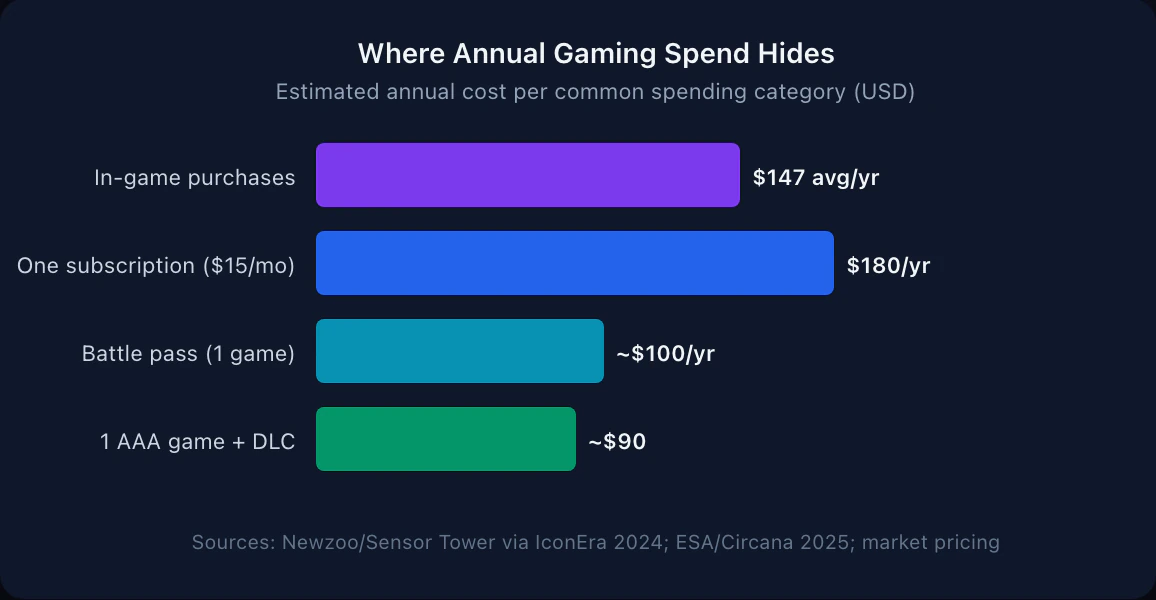
- The average gamer spends around $147/year on in-game purchases alone, before counting subscriptions or new games
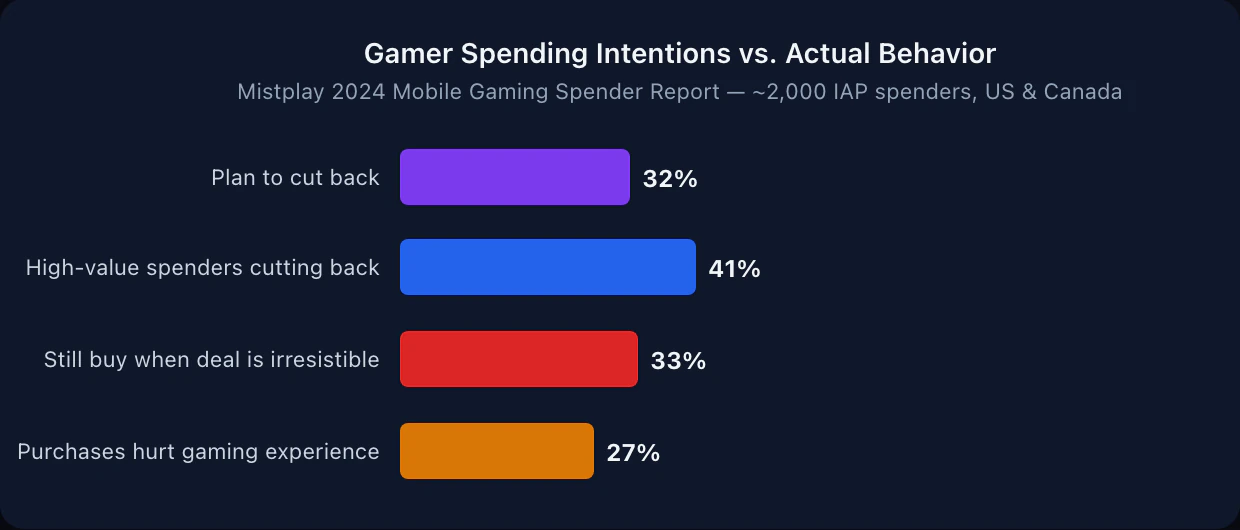
- 32% of in-game spenders plan to cut back — but 33% of those still impulse-buy when a deal feels 'too good to pass up'
- The fix isn't willpower — it's visibility: seeing your real number changes how you spend
- Five steps: audit, separate, set a limit, watch the traps, review monthly
Most gamers know they spend money on games. Most gamers don’t know their number.
Not even close. The spending is scattered — a subscription here, a battle pass there, a $5 currency pack that felt like nothing at the time. Add them up and the total surprises people. According to the Mistplay 2024 Mobile Gaming Spender Report, 32% of in-game spenders plan to cut back on their spending — which means a third of paying gamers already sense the problem. The harder question: what exactly are they planning to cut, if they can’t see it clearly?
This guide gives you five steps to answer that question. By the end, you’ll know your actual number, where it goes, and how to set a limit you can hold to.
For more on how to find the right gaming spend target for your situation, see how much you should spend on games per month.
Quick Answer: How Do You Track and Control Gaming Spending?
To track and control gaming spending, run a 90-day audit of every gaming purchase across your bank, app stores, and in-game history to find your real number, convert everything back to actual dollars, set a monthly cap you can hold to, and review the total regularly so nothing slips back into invisibility. The core problem isn’t any single purchase — it’s that gaming spending is fragmented across platforms and hidden behind virtual currency. The fix is making the full number visible in one place. For context on how your number compares, see the data on how much gamers really spend per year.
Why Gaming Spending Is So Hard to Track
Before the steps, it’s worth understanding why this is harder than tracking a grocery bill.
Gaming spending is intentionally fragmented. You buy a game on Steam, pay a Game Pass subscription through your bank, pick up a battle pass in-game, and add a $2 currency pack while you’re at it. Each one happens in a different app, in a different currency, for a different game. None of them sit together in a way that shows you a total.
Add the currency conversion layer — gems, coins, tokens, V-Bucks — and the connection to real money gets weaker. You’re not buying a $10 item; you’re topping up 1,000 credits that happen to cost $10. The games aren’t designed to show you what you’ve spent. That job is yours.
The result: most people estimate low. They remember the big purchases and forget the small ones. Running a real audit, even once, usually surfaces a number that feels higher than expected.
Step 1: Run a 90-Day Spending Audit
You can’t control what you can’t see. The first step is a one-time audit — look back 90 days and find everything.
Where to look:
- Bank and credit card statements (search “steam,” “playstation,” “nintendo,” “apple,” “google”)
- Email receipts (search “your receipt” or “purchase confirmation” from gaming storefronts)
- App Store or Google Play purchase history
- Console store history: here’s how to see how much you’ve spent on Xbox and on PlayStation, since neither shows a lifetime total
- In-game purchase history (most games have this under account settings; for Steam, here’s how to find your real lifetime Steam spending)
- PayPal or digital wallet transaction history
Build a simple list: date, game or platform, amount. Don’t filter anything out yet. Include the $1.99 currency packs and the $0.99 app.
Once you have 90 days, multiply by four to get an annual estimate. If you see $180 across 90 days, you’re on pace for roughly $720 a year on gaming. That number — in actual dollars, not split across currencies and platforms — is the foundation.
For a step-by-step walkthrough of building an expense tracking habit, see the guide to how to track expenses.
Step 2: Separate Gaming Money From Everything Else
Once you have a real number, the next move is isolation. As long as gaming spending shares a pot with groceries, gas, and everything else, it stays invisible month to month.
The simplest version: create a dedicated gaming envelope, category, or budget line. Every gaming-related purchase — new games, DLC, subscriptions, battle passes, in-app buys — comes out of that one place. Nothing else does.
This works because of a visibility effect. When you see your gaming spend climbing through the month as one number, your awareness changes. You make different decisions at $40 of an $80 limit than you do when the gaming spend is hidden inside your general balance. The spending hasn’t changed — your view of it has.
A tool like Hunter Vault does this by giving gaming its own budget and showing a running monthly total of what you log. A spreadsheet works too. The medium matters less than the separation.
Step 3: Set a Budget That Actually Fits Your Situation
Now you have a real baseline. The question is whether that number should stay, go up, or come down.
Don’t start with what’s “normal.” US consumer gaming spend totaled $60.7 billion in 2025 according to ESA and Circana — an average across everyone from casual mobile players to full PC rigs. That spread is too wide to be a target. Start with what you have.
A simple method:
- Take your monthly take-home income
- Subtract all fixed costs: rent, bills, insurance, debt minimums
- From what’s left, allocate savings and any committed spending
- What remains is your real discretionary pool
- Gaming is one slice of that pool — a reasonable starting point is 10%, adjusted up or down based on how much gaming matters to you compared to other things you want to spend on
If that gives you $60/month and your audit showed $140, you have a real gap to address — and now you can have an honest conversation with yourself about where to cut. Maybe you drop one subscription. Maybe you stop the battle pass on the game you barely play. Maybe the number is fine and you choose to raise your gaming slice and reduce something else.
The goal isn’t minimization. It’s making the number a decision, not a side effect.
For more on building a gaming budget that doesn’t require quitting games entirely, see how to budget for gaming without quitting.
Step 4: Watch the Four Silent Drains
Most gaming overspending isn’t one big purchase — it’s four small categories that each feel reasonable on their own.
Subscriptions on auto-renew
According to ESA and Circana data, US gamers spent $3.6 billion on gaming subscriptions in 2025 — up 20% from the prior year. A large share of that runs on autopilot. A quick test: can you name every gaming subscription you’re currently paying for, with the exact monthly cost? If not, that’s your first stop.
A 15-minute subscription audit — scanning your bank statement for gaming-related auto-renews — often surfaces one or two services that have been quietly renewing past the point of regular use. For a deeper look at getting the most value from Game Pass, PS Plus, and Switch Online, see our gaming subscription budget guide.
Battle passes and seasonal resets
A single battle pass at $10 sounds cheap. When a game runs four seasons a year and you play two or three live-service titles, that’s $80 to $120 before you’ve bought a single in-game item. And these reset on a schedule the game controls, not yours — which means the decision to rebuy happens at the launch of each new season, when hype is highest.
The fix: list every battle pass you’re currently on. Decide in advance, per game, whether the next season is worth continuing — not in the heat of a new launch. To make that call with numbers instead of hype, run the battle pass ROI check before each new season.
Small currency top-ups
The Mistplay 2024 Mobile Gaming Spender Report found that 33% of gamers who planned to cut back still made in-game purchases when a deal felt “too good to pass up.” Currency bundles are priced to land just below the threshold where you’d pause and think. The $9.99 pack feels closer to $5 than to $10.
One habit that helps: log currency purchases in real dollars the moment you buy them. “I just spent $9.99” registers differently than “I topped up 1,000 gems.” The number connects the cost to your actual budget. For a dedicated system covering all free-to-play purchases, see our microtransaction spending tracker.
For a closer look at why these small amounts stack up so fast, see why small purchases add up.
The “I’ll play it eventually” backlog buy
Steam sales, App Store promotions, free-to-claim games. These feel cheap or free and many never get played. A backlog isn’t savings — it’s spending that already happened. A useful rule: don’t buy it unless you’ll actually play it in the next 30 days. If Steam sales are your particular weak spot, our guide on how to stop impulse buying on Steam sales has the tactics.
Step 5: Do a Monthly 10-Minute Review
Setting a budget once doesn’t make it work. The monthly check-in is what turns a number into a habit.
A 10-minute monthly review covers four things:
- Total spent on gaming this month — did it hit the limit?
- Biggest line items — where did most of it go?
- Anything automatic coming up next month — battle pass reset, subscription renewal?
- One adjustment — cut something that didn’t add much value, or give yourself permission to spend more on something that did
This review matters more than the initial setup. Most gaming overspending isn’t about willpower — it’s about a lack of visibility at the moment decisions get made. A monthly review shifts you from reactive (realizing how much you spent after the fact) to proactive (knowing what’s coming before it hits).
If a review reveals your spending has crept up, a short reset can help recalibrate — try the 30-day gaming no-spend challenge to see how much of your spend is habit versus intention. For a walkthrough of how to run a weekly or monthly spending review, see the weekly spending review guide.
Hunter Vault gives gaming its own spending category so every purchase you log — Steam, in-app, subscriptions — lands in one place. See your monthly total update as you log, set a limit, and get a clear picture without auditing three storefronts at the end of every month. Try it free.
What Good Spending Control Actually Looks Like
The goal isn’t to spend as little as possible on gaming. Gaming is a legitimate hobby — for a lot of people, a serious one. The goal is to spend consciously: to know what you’re spending, decide what it should be, and actually hold to it.
When that’s working, it looks like this: you can name your monthly gaming budget without looking it up; you know which subscriptions you’re on and why; you don’t feel surprised or guilty after purchases; and when a game drops that you genuinely want, you can buy it without stress because you’ve planned for it.
That’s the practical win. Not a smaller number — a number you chose.
If you want to go deeper on the different types of gaming spend and how to think about each one, how to budget for different types of gaming spending breaks it down by subscription, microtransaction, and one-time purchase.
This is general educational content, not financial advice. Your right budget depends on your income, obligations, and financial goals.
Final Thoughts
Gaming spending is easy to lose track of because it’s designed to be. The spending is spread across platforms, disguised in currencies, and triggered by timers and limited offers. Getting control starts with making it visible — all of it, in one number, in one place.
Five steps: audit what you’ve spent in the last 90 days, separate gaming money from everything else, set a budget based on your real numbers, watch the four categories that quietly drain the most, and check in monthly to keep it honest.
The first audit is the hardest part. After that, it’s maintenance.
Start now: add up what you spent on gaming last month — every platform, every in-app purchase — in real dollars. That number, unfiltered, is your starting point for everything else.
Frequently Asked Questions
How do I track all my gaming spending in one place?
Start with an audit: list every recurring gaming cost — subscriptions, battle passes — and add up the last 90 days of in-game purchases from your bank statements and email receipts. Then give gaming its own budget category and log every purchase there going forward. A dedicated app like Hunter Vault keeps all gaming spend visible in one running total instead of scattered across three storefronts.
How much should a gamer budget for gaming per month?
A practical starting point is around 10% of the money left after essentials — rent, bills, food, and debt minimums. For most people that lands between $30 and $100 a month. More important than the exact number is making it a conscious choice rather than something that happens by default.
Why do gamers tend to overspend on in-game purchases?
Game design does a lot of the work. In-game currencies, limited-time offers, and low individual price points all make spending feel lower-stakes than it is. A Mistplay 2024 survey found that 33% of gamers who planned to cut back still bought something when a deal felt 'too good to pass up' — the friction is intentionally low.
What are the hidden gaming costs most people forget to budget for?
The biggest blind spots are gaming subscriptions on auto-renew, battle passes that reset every season, and small in-game currency packs that feel cheap individually. Also watch for DLC, expansion passes, and platform fees like PS Plus or Nintendo Switch Online.
Is there a free way to track gaming spending?
Yes. A spreadsheet with columns for date, game, amount, and category works fine. The key is capturing every purchase — including in-app — at the moment it happens, not at month's end. Hunter Vault has a free tier that gives gaming its own spending category with a monthly total you can check anytime.