- F2P games use virtual currency and no running total to make spending invisible — the surprise is by design
- Only 0.25% of players drive 64% of all in-game purchase revenue; if you've spent anything, you're probably in the upper half
- Step one is finding your actual number from your app store or bank history — most people underestimate it significantly
- Set a monthly cap from money left after essentials, keep it in its own pot, and log every top-up as real money
- If spending ever feels out of your control, that's bigger than a budgeting fix — and worth taking seriously
You opened your bank app and stopped.
You’d bought a few packs this month — a limited event bundle, a currency top-up to finish a banner, maybe a battle pass you grabbed on sale. Each one felt like nothing in the moment. Together, they’re something else.
This is the core problem with free-to-play game spending: it’s engineered to feel small until you look at the total. This guide walks you through how to find your real number, set a cap that actually holds, and build a tracking habit that keeps the cost visible before you spend — not after. It applies to all free-to-play spending — battle passes, cosmetic bundles, and currency top-ups. If your spending is specifically on gacha banner pulls, our guide to controlling gacha spending goes deeper on pity systems and 50/50 banner mechanics.
For context on how gaming spending fits into a broader budget, how much should you spend on games per month covers the full picture.
Quick Answer: How Do You Track Microtransaction Spending?
To track microtransaction spending, convert every purchase back to real dollars — not in-game currency — log each one in a single place, and set a monthly cap before you spend rather than after. F2P purchases feel small individually because virtual currency hides the real cost, so the fix is making the month’s running total visible in actual money. Once you can see the sum, the spending becomes a decision instead of a reflex.
Why F2P Games Are Designed to Hide the Cost
F2P monetization doesn’t create invisible spending by accident. Three mechanisms make in-game purchases consistently hard to track.
Virtual currency obfuscation. You don’t buy a skin for $12.99. You buy 1,000 V-Bucks, 60 Primogems, or 300 Crystals — and then spend those on the skin. The conversion step buffers the purchase from feeling like real money. Research presented at the ACM MUM 2024 conference on mobile game interfaces identified this as one of the most consistently used dark patterns in mobile game design, specifically because it suppresses cost perception at the moment of purchase (ACM Digital Library, 2024).
Variable-ratio reinforcement. Loot boxes, gacha banners, and mystery crates pay out on a random schedule — structurally identical to a slot machine. Variable-ratio reinforcement is the most persistent reward schedule in behavioral psychology: the randomness is precisely what keeps you pulling. A 2024 peer-reviewed study found that loot box engagement is directly associated with financial harm and elevated problem gambling severity scores, independent of how much someone otherwise gambles (ResearchGate, 2024).
FOMO and false scarcity. Limited-time events, expiring banners, and “last chance” countdown timers create urgency that bypasses the normal pause before a purchase. The spending decision happens in a spike of anxiety, not from a calm position.
None of this means F2P games are traps you need to escape. Most people play them without financial harm. But understanding why spending feels small is the first step to making it visible — which is what actually lets you control it.
For a closer look at why small purchases add up across any category, that post covers the psychology.
What F2P Players Actually Spend
The numbers are more concentrated than most players expect.
According to the 2024 Unity Mobile Growth and Monetisation Report (via IconEra, 2025), only 1.83% of mobile gamers make any in-app purchase at all. GameAnalytics data reported by Udonis (2024) breaks it down further: 72% of F2P players spend nothing, while less than 0.25% of players account for 64% of all in-app purchase revenue — the so-called “whales.” For how this fits into total gaming budgets across platforms, see our breakdown of how much gamers really spend per year.
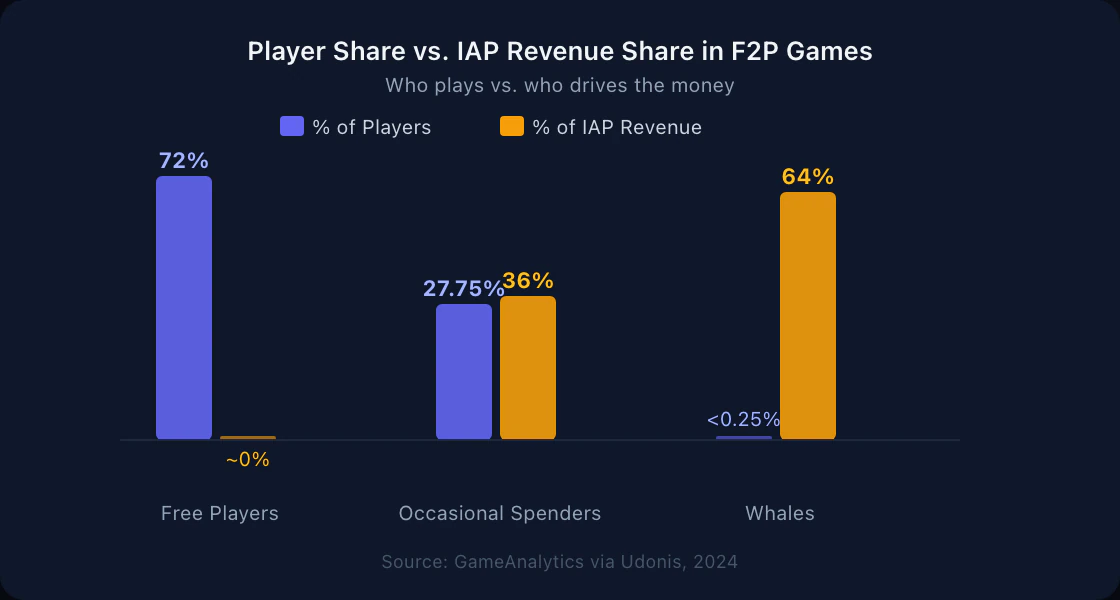
That concentration means something practical for how you read your own spending. If you’ve spent even $20 on a single F2P game, you are likely already in the top 30% of all players by spending. If you’ve spent $50 in one month, you may be in the top 10%. The players who feel like they “barely spend” are often in the upper-middle band — not the low end.
The average gamer spent $147 on in-game microtransactions in 2024, up from $132 the year before, according to Sensor Tower and Unity data compiled by IconEra (2025) — roughly $12 per month. That’s the mean, pulled up by heavy spenders. The median is significantly lower.
A February 2025 survey of 1,000 Japanese gamers aged 20–29 by SMBC Consumer Finance found that 18.8% said in-game purchases had left them struggling to cover basic living expenses, and 23.9% expressed regret about their total in-game spending (TechSpot, April 2025). Both numbers rose year-over-year.
Step 1: Find Your Actual Number First
Before you set any cap or system, you need to know what you’ve actually spent. Most players underestimate this — because purchases are scattered across months and don’t feel memorable individually.
Check your app store purchase history
On iPhone: Settings → your Apple ID → purchase history, or visit reportaproblem.apple.com for itemized charges. On Android: open Google Play → tap your profile icon → Payments & subscriptions → Purchase history. Filter by the game publisher’s name. Total every charge — not gem bundles, but real dollar amounts.
Filter your bank or card statement
Search for the publisher name in your bank app (Cognosphere for Genshin/Honkai, Supercell for Clash titles, etc.). Total every charge over 3 months, then 6. The 6-month number is usually the first one that surprises people.
Write the number down
Total across every F2P game. Write it on paper or put it in a note — not just in your head. Seeing it as one number instead of scattered small transactions is more informative than any spreadsheet. This is your baseline.
If you play multiple titles, the totals stack. A $10 monthly battle pass, a $5 event bundle, a currency top-up in one more game — across three titles that’s $40–60 before a single “big” purchase.
For game-specific guides: tracking your Ragnarok spending and tracking Genshin or Honkai spending cover how to pull numbers from those specific titles. There are also step-by-step guides for CS2, Fortnite, Valorant, League of Legends and Mobile Legends.
Step 2: Set Your Cap Before You Open the Game
The worst moment to decide how much to spend is mid-session when a limited banner expires in four hours. That’s not a decision — it’s a reaction.
Your spending cap needs to be set in advance, from a calm position, based on what’s genuinely left after your fixed expenses.
Limits set mid-session almost never hold. FOMO and the sunk-cost pull of an ongoing event override them. Decide your monthly number when you’re not playing and treat it as fixed — adjustments happen at the start of the next month, not during a banner.
The mechanic that works best for most players is a fun money vault: a fixed monthly amount moved to a separate balance or envelope before the month starts. This is the money available for gaming (and other discretionary entertainment). When it’s gone, the month is done — you’re not negotiating with rent or savings, the pot is simply empty.
Decide the vault size from your monthly leftover (income after fixed expenses, savings contributions, and minimum debt payments) — not from your total income. A common starting point is 10–15% of whatever’s genuinely spare. Finding what’s safe to spend walks through how to calculate that number from your actual budget.
Step 3: Log Every Purchase in Real Money
Virtual currency only hides cost if you let the real-money amount stay invisible.
When you buy 1,600 Crystals for $9.99, log it as $9.99 immediately — not “1,600 Crystals” or “a pack.” The gem-to-dollar conversion at the point of spending (when you pull or buy the skin) is too late; by then the money feeling has already been abstracted away.
A simple tracking system for microtransaction spending:
- One line per purchase: date, game, real-money amount
- Monthly total somewhere visible you check regularly
- A running count against your monthly cap
This doesn’t need an app. A note on your phone with a running dollar total is more reliable than a dedicated tracker you’ll stop opening by week two. What matters is that the real number is visible before you spend — not after.
For a broader system for tracking your expenses, that guide covers how to set up categories that actually stick.
Step 4: Add Friction Before the Next Top-Up
If a cap isn’t holding because you always find a reason to top up one more time, the problem is usually that buying is too frictionless. Four tactics that work:
- Remove your saved card from the app store. Requiring a manual card entry adds 60 seconds and breaks the flow-state momentum. Our guide covers removing a saved card from Xbox, PlayStation, Steam, Roblox, Nintendo and your phone’s app store.
- Apply a 24-hour rule. No top-up during a live limited event — come back tomorrow. The urgency is engineered to feel permanent; it rarely is.
- Translate the purchase back to something concrete. Before confirming a $14.99 bundle: that’s a full meal, two coffee runs, a streaming month. Not to guilt yourself — to make it comparable.
- Log close calls, not just purchases. When you decide not to top up, write it down. Reinforcing the decision makes the next one easier.
For more tactics on interrupting the impulse pattern, stopping impulse spending covers the same friction approach applied to spending broadly.
If spending feels out of your control, you chase a bad pull with another top-up, or you’re hiding purchases from people close to you — that’s past budgeting territory. F2P loot box mechanics share real structural features with gambling. A 2024 peer-reviewed study confirmed the link between loot box engagement and financial harm. That’s a design fact, not a personal failing — and talking to a professional is a reasonable response, not an overreaction.
Putting It Together: A Microtransaction Tracker That Works
You don’t need dedicated software to track microtransaction spending. Here’s what works at three levels of effort:
Minimal (5 minutes to set up): A note in your phone. Three pieces of info per line: date, game, dollar amount. Check the running total before any new purchase. Stop when you hit your monthly cap.
Structured: A budget with a “gaming” category. Every top-up is logged against that category in real time. When the category limit is reached, the month’s gaming spend is closed.
Vault-based: A separate balance topped up at the start of each month with your gaming budget. You spend only from that balance — when it’s empty, the month is done. Hunter Vault supports this with vaults (manual records you label by purpose) alongside budgets with monthly limits. Budgeting for gaming without quitting covers the vault approach in detail.
The method matters less than the outcome: the real-money number is visible before you commit, not after.
The Fix Is Visibility, Not Quitting
Most F2P spending problems aren’t discipline problems — they’re visibility problems. The game is designed to remove friction between you and a purchase, and to make the running total as hard to see as possible.
The fix isn’t to stop playing. It’s to make the cost visible before you commit to it — because a number you can see is a number you can manage.
Find your actual number first. Set a cap from your real leftover money. Log every purchase in real dollars. Add friction to impulse buys. That’s the complete system, and it works not by fighting the game’s design but by putting the information it hides back in front of you.
For a closer look at the gacha spending pattern specifically, how to stop overspending on gacha games covers the pull mechanics and how to cap them.
Frequently Asked Questions
How do I track my microtransaction spending?
The most reliable starting point is your app store purchase history. On iOS, go to Settings → your name → purchase history, or visit reportaproblem.apple.com. On Android, check Google Play → Payments & subscriptions → Purchase history. Filter by the publisher name and total every charge. Going forward, log every top-up as the real-money amount the moment you buy it — not the gem or crystal equivalent.
Why does microtransaction spending add up without you noticing?
F2P games sell virtual currency — gems, crystals, V-Bucks — rather than items directly. Each transaction doesn't feel like spending real money because the exchange happened one step earlier. There's no running total anywhere in-game, limited-time events push decisions into anxious moments, and the variable-ratio pull of loot boxes keeps you coming back. Most players genuinely can't estimate their own monthly spend without looking it up.
What is a reasonable monthly amount to spend on F2P games?
Only what you're genuinely comfortable losing, from money left after essentials. Many players find a 'fun money vault' works better than a mental limit — a fixed monthly amount moved to a separate balance before the month starts. When the vault is empty, the spending stops. The right number is personal; a common starting point is around 10% of whatever's genuinely spare after bills, savings, and debt payments.
What's the difference between a regular spender and a whale?
Most paying F2P players are occasional spenders who buy a pack here and there. A whale is someone in the top 1–2% of spenders, often spending hundreds per month on a single game. Less than 0.25% of F2P players account for 64% of all in-game purchase revenue (GameAnalytics, 2024). If you've spent more than $50 on one game in a single month, you're likely already in the upper tier of spenders for that title.
When does microtransaction spending become a real problem?
When it affects bills, relationships, or feels out of your control. Gacha and loot box mechanics share structure with gambling — a 2024 peer-reviewed study found loot box engagement is directly associated with financial harm and elevated problem gambling severity scores. That's a design fact, not a character judgment. If spending feels compulsive, talking to someone you trust or a professional is a reasonable response, not an overreaction.