- PS Plus raised monthly and quarterly prices in May 2026 — annual plans were not affected
- Game Pass Ultimate dropped from $29.99 to $22.99 in April 2026, but is still $3/month more than before October 2025
- Three major gaming subscriptions combined cost $37.97/month — $455.64 per year — before you buy anything
- Annual billing saves you real money: PS Plus Essential annual works out to $6.67/month vs $10.99/month on monthly billing
- The cost-per-game check — not the monthly price — is what tells you whether a subscription actually earns its spot
Gaming subscription prices moved a lot in the past twelve months. Game Pass jumped 50% in October 2025, then partially rolled back in April 2026. PS Plus raised monthly and quarterly prices in May 2026. Most gamers noticed the charges and moved on — but stacked up, the numbers add up faster than any single monthly fee suggests.
This guide walks through how to calculate what gaming subscriptions are actually costing you, run a value check on each one, set a budget cap, and switch to billing cycles that save you money without cutting games you actually play.
Quick Answer: How to Budget Gaming Subscriptions
Add up every active gaming subscription and multiply by 12. That’s your real annual cost. Then divide each subscription’s monthly price by the number of games you actually played from it last month — that’s your cost per game. Compare it to what those games would have cost to buy on sale. If the subscription wins, keep it. If it doesn’t, downgrade or cancel. For the ones you keep, switch to annual billing where it’s offered. On the services in Step 4 it saves about $16 to $80 a year per service, but Xbox Game Pass has no annual plan at all.
What Gaming Subscriptions Actually Cost Per Year
The monthly prices look manageable in isolation. The combined annual total is what usually surprises people. For a benchmark to compare yourself against, see the average gamer’s monthly subscription spend.
Subscriptions are only one slice of the bigger picture. If you game on PC, the true cost of PC gaming shows how subscriptions stack up against hardware and game purchases over a full five years.
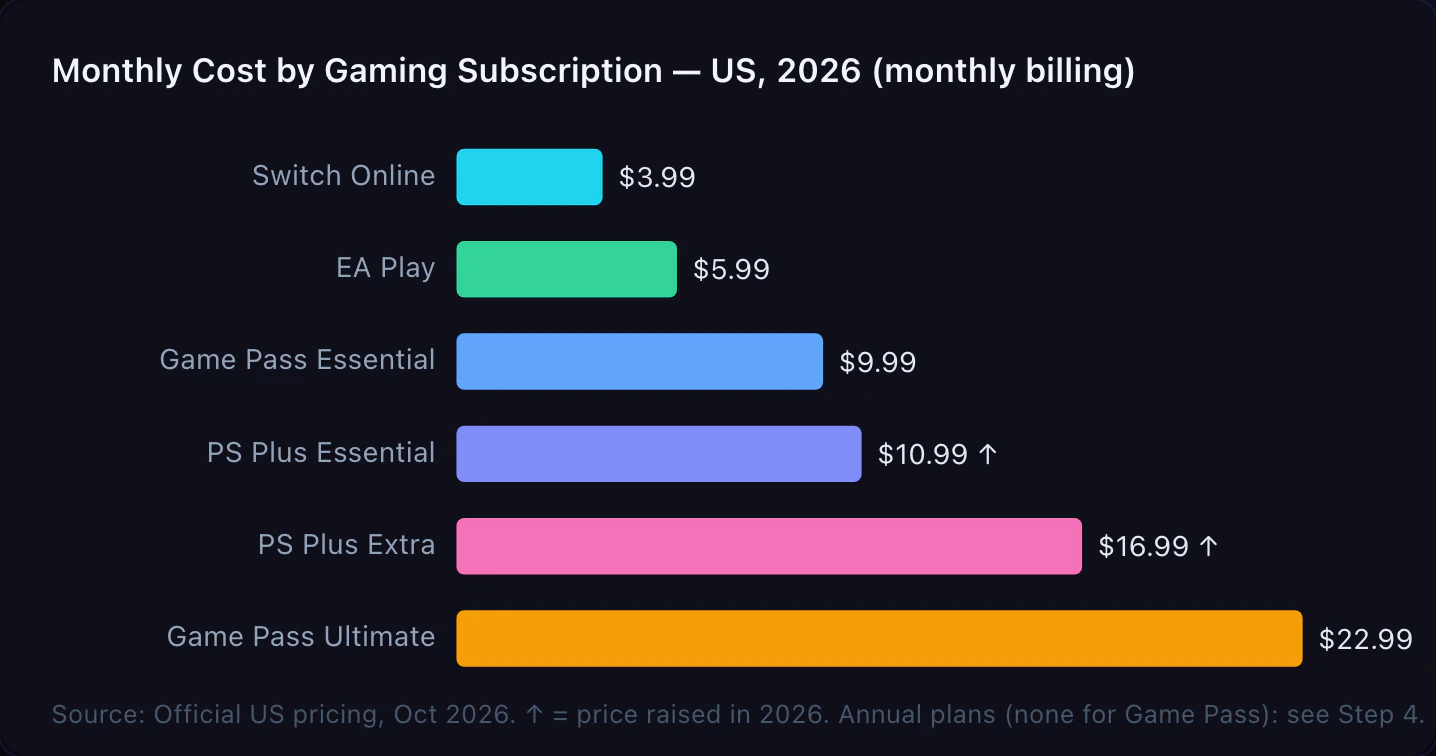
If you have Game Pass Ultimate, PS Plus Essential, and Switch Online, that’s $37.97/month — $455.64 per year before you buy a single game. Add EA Play separately (which is already bundled into Game Pass Ultimate, though many people don’t realize this) and you’re doubling up on the same library.
Gaming subscription market revenue reached $11.53 billion globally in 2024 and is growing at roughly 13% annually (Mordor Intelligence, 2025). These services are pricing with confidence. Your budget doesn’t have to follow automatically.
Step 1: Add Up Your Actual Monthly Total
List every active gaming subscription
Most people underestimate their total because they think of each service separately. The job here is to see one combined number.
List every active gaming subscription you’re paying for right now:
- Console services: PS Plus (which tier?), Game Pass (which tier?), Nintendo Switch Online (basic or Expansion Pack?)
- Platform add-ons: EA Play standalone, Ubisoft+ standalone, Apple Arcade
- Cloud gaming: GeForce Now (if you pay for a tier above free)
- Battle passes or recurring passes: Fortnite Crew ($11.99/month), Minecraft Realms, or similar monthly passes that auto-renew
Add the monthly cost of each. Then multiply the total by 12. That annual number is what gaming subscriptions are actually costing you.
For anything billed annually, divide the annual charge by 12 to get the monthly equivalent. The goal is one clear number: your total gaming subscription spend per month.
Planning for GTA 6? Both console store listings call it a single-player experience, so playing it doesn’t add PS Plus or Game Pass to this list. Here’s what GTA 6 will really cost you.
For a broader audit that also covers streaming, music, and every other recurring charge you’re paying, see our full subscription audit guide.
Step 2: Run the Cost-Per-Game Check
Calculate what you're actually paying per game played
The monthly price tells you what a subscription costs. The cost per game tells you whether it’s worth it.
The math is simple:
Cost per game = Monthly subscription price ÷ Games played from that library last month
The clearest way to judge value is cost-per-game. If you play around 1.5 different titles per month from the library — a realistic figure for a typical subscriber — then at $22.99/month for Ultimate you’re paying about $15.33 per game, roughly the same as a Steam sale purchase, without the ability to resell afterward. Run the number against your own play history: count how many distinct library games you actually launched last month and divide your subscription cost by it.
The math shifts at higher play rates:
| Games played per month | Cost per game — Ultimate ($22.99) | Cost per game — PS Plus Extra ($16.99) |
|---|---|---|
| 1 game | $22.99 | $16.99 |
| 2 games | $11.50 | $8.50 |
| 3 games | $7.66 | $5.66 |
| 5 games | $4.60 | $3.40 |
Subscriptions win clearly at 3 or more games per month from the library. Below that, buying on sale is often the better deal — and you own what you buy.
Do this check for each service separately. A subscription that covered four different games you actually finished last month is a clear keep. One you opened once to try something and forgot about is a cancel.
Step 3: Set a Monthly Subscription Cap
Pick a number and commit to it
Once you know your actual total, decide on a cap — the most you’re willing to spend on gaming subscriptions per month, regardless of what’s available.
A practical starting point: keep gaming subscriptions under 10% of your total monthly entertainment budget. If your entertainment budget is $150/month, that’s $15 for gaming subscriptions. If it’s $300, that’s $30.
If you don’t track an entertainment budget yet, use a flat cap based on your play habits:
- Light gamer (1–2 hours/week): $10–$15/month — one entry-tier service, nothing else
- Regular gamer (5–10 hours/week): $15–$25/month — one mid-tier service or two entry-tier
- Heavy gamer (15+ hours/week): $25–$40/month — one premium service plus one secondary
Set the cap before you look at what’s available. Deciding the budget after you’ve already listed everything you want leads to rationalizing each service as essential.
The most common reason people overpay on gaming subscriptions is keeping a service for “one more month” expecting to play it more — then not playing it. If a subscription didn’t earn its cost in the last 30 days, it probably won’t next month either, unless a specific game you’ll actually start is releasing imminently.
Step 4: Switch to Annual Billing Where It Makes Sense
Move services you're keeping to annual billing
Sony’s May 2026 PS Plus price increase only targeted monthly and quarterly plans. Annual plans stayed exactly where they were. That created one of the clearest value gaps in gaming subscription history — and most people who pay monthly are still missing it.
Annual vs. monthly billing: the break-even table (US prices as of October 2026)
| Service | Monthly price × 12 | 12-month plan | Yearly saving | Annual is cheaper if you’d stay |
|---|---|---|---|---|
| PS Plus Essential | $10.99 × 12 = $131.88 | $79.99 | $51.89 (39%) | 8+ months |
| PS Plus Extra | $16.99 × 12 = $203.88 | $134.99 | $68.89 (34%) | 8+ months |
| PS Plus Premium | $19.99 × 12 = $239.88 | $159.99 | $79.89 (33%) | 9+ months |
| Switch Online (individual) | $3.99 × 12 = $47.88 | $19.99 | $27.89 (58%) | 6+ months |
| Switch Online + Expansion Pack | No monthly option | $49.99 individual, $79.99 family | n/a | n/a |
| Switch Online family (up to 8 accounts) | No monthly option | $34.99 | n/a | n/a |
| EA Play | $5.99 × 12 = $71.88 | $39.99 | $31.89 (44%) | 7+ months |
| Ubisoft+ Classics | $7.99 × 12 = $95.88 | $79.99 | $15.89 (17%) | 11+ months |
| Ubisoft+ Premium | $17.99 × 12 = $215.88 | $179.99 | $35.89 (17%) | 11+ months |
| Xbox Game Pass (any tier) | $9.99 to $22.99 × 12 = $119.88 to $275.88 | No annual plan | None | n/a |
Sources: PlayStation Plus, Nintendo Support, EA Play, Ubisoft+ and the Xbox Store, checked October 19, 2026. The last column is the point where that many months of monthly billing costs more than the 12-month plan.
Xbox Game Pass has no annual billing. Xbox’s plan page sells every tier per month: Essential at $9.99, Premium at $14.99, PC Game Pass at $13.99 and Ultimate at $22.99. The only Game Pass levers are your tier and how many months you keep it. To see what Game Pass has cost you so far, check your Xbox order history.
Nintendo works the other way round. Its pricing page lists the Expansion Pack only at a yearly price, and family plans come in 12-month terms only, per Nintendo’s FAQ. If two people in your home each pay $19.99 for individual plans, that’s $39.98, and the $34.99 family plan covers up to eight accounts for less.
PS Plus and Switch Online also sell 3-month plans. A full year of PS Plus Essential bought in 3-month blocks ($27.99 each) costs $111.96, so it sits between monthly and annual billing.
For services that offer an annual plan, switch if you’d keep it past the break-even point in the last column. That’s 8 to 9 months for PS Plus, 6 for Switch Online, 7 for EA Play and 11 for Ubisoft+.
PS Plus Essential annual at $79.99 works out to $6.67/month — that’s $4.32 less per month than the new monthly rate. On PS Plus Extra, the annual plan saves you $68.89 per year. That’s the cost of a full-price new game you get to keep.
The one consideration: annual billing requires paying the full amount upfront. If that’s a stretch right now, setting aside the monthly equivalent into a dedicated savings pot each month means the annual charge is already covered when renewal lands — no surprise.
Do gaming subscriptions actually save money over a year?
It depends on how many games you actually play from each library. The annual price alone can’t tell you. A year of PS Plus Essential at $79.99 beats $131.88 in monthly payments. But it only saves you money if you’d otherwise have paid for those games or for online play.
The test is cost per game played, from Step 2, stretched over a year. Divide the yearly cost by the number of library games you played that year. If the answer is less than you’d pay to buy those games on sale, the subscription saved you money. If it’s more, the annual plan only makes a poor deal cheaper.
Two quick checks before you pay upfront:
- Would you keep it past the break-even month? If you only subscribe for a big release, then cancel, monthly billing can cost less.
- Is it already bundled? If you have Game Pass Ultimate, EA Play and Ubisoft+ Classics are already included. An annual plan for either one on top is paying twice.
Step 5: Track It Going Forward
Make subscription costs visible every month
Gaming subscriptions are invisible spending — the money leaves automatically and the charge is small enough that it rarely triggers a second look. Making it visible once a month changes that.
After you’ve set your cap and switched to annual billing for the services you’re keeping:
- Keep a single list of all active gaming subscriptions — service name, tier, monthly cost (or annual cost ÷ 12), and renewal date. Your PlayStation Transaction History shows every PS Plus renewal you’ve already paid
- Set a reminder 5 days before each annual renewal — that’s your window to cancel if your situation changed since last year
- Do the cost-per-game check once a month — it takes two minutes and tells you immediately whether each service earned its spot
For annual subscriptions, note the monthly equivalent so you can see the real cost in your budget each month instead of getting a $159.99 charge that feels like it came from nowhere.
Common Mistakes to Avoid
Paying monthly for a service you’ve had for a year. Monthly billing on PS Plus Extra costs $203.88/year. The annual plan is $134.99. That’s $68.89 — about two game purchases — that you’re leaving behind every year just to avoid paying a lump sum.
Subscribing to EA Play separately while you have Game Pass Ultimate. EA Play is included in both Game Pass Ultimate and PC Game Pass at no extra cost. Subscribing to it separately is paying twice for the same catalog. Same goes for Ubisoft+ Classics and Fortnite Crew, which Xbox’s plan page also lists as part of Game Pass Ultimate.
Keeping a service for one game. Subscribing to a $16.99/month service to play one specific title that launched on it — without playing anything else — costs $16.99 for that game. If the game is available to buy outright for less, that’s the better deal.
Forgetting annual renewal dates. A $159.99 annual charge arriving unexpectedly hits differently than a $13.33 monthly equivalent you’d budgeted for. Log every annual renewal date and set aside the monthly equivalent so the charge is never a surprise.
Where Hunter Vault Fits
You can track your gaming subscriptions in a spreadsheet or notes app. If you’d rather keep it alongside the rest of your budget, Hunter Vault’s bill tracker holds all your recurring charges in one place with renewal dates visible — no bank account linked, nothing automatic, just what you choose to put in.
For annual subscriptions you’re switching to, set up a savings goal for it and log the monthly equivalent as you set the cash aside in your bank. Put aside $13.33/month for PS Plus Premium and the $159.99 annual charge is already covered when renewal arrives. Track your recurring charges and you stop getting surprised by renewal dates. Keep your bills visible and subscription creep stops happening quietly.
Final Takeaway
Gaming subscriptions are easy to accumulate and easy to forget about. The total only becomes obvious when you multiply the monthly price by twelve.
Pick a cap. Run the cost-per-game check to see which services actually earned their spot last month. Switch the ones you’re keeping to annual billing. Log the renewal dates. That’s the entire system.
Start with one action: add up every gaming subscription you’re currently paying for and multiply by 12. The annual number usually changes how the monthly price feels.
If you want to keep it tracked alongside your full budget, try Hunter Vault — available on iOS and Android.
This is general educational content, not financial advice. Pricing listed reflects publicly available US rates as of October 2026 and may change. Always verify current pricing on each service’s official website before subscribing or changing your plan.
FAQ
How much do gaming subscriptions cost per month in 2026?
As of October 2026, major US monthly prices are: Game Pass Ultimate $22.99, Game Pass PC $13.99, Game Pass Essential $9.99, PS Plus Essential $10.99, PS Plus Extra $16.99, PS Plus Premium $19.99, Nintendo Switch Online $3.99, and EA Play $5.99. PS Plus monthly and quarterly plans increased in May 2026; annual plans were not changed. A gamer subscribed to Game Pass Ultimate, PS Plus Essential, and Switch Online pays $37.97/month — $455.64 per year.
Is it cheaper to buy games or subscribe to Game Pass?
At the average utilization rate of 1.5 games per month, Game Pass Ultimate costs about $15.33 per game played — comparable to a typical Steam sale price. Game Pass wins financially when you play 3 or more different games per month from the library. Buying outright makes more sense if you play the same small set of games for long stretches, since you also retain resale value.
Should I pay monthly or annual for PS Plus?
Annual billing is significantly cheaper for every PS Plus tier. After the May 2026 monthly price increase, PS Plus Essential annual ($79.99/yr = $6.67/month) saves $51.89 per year versus monthly billing at $10.99. PS Plus Extra annual saves $68.89/year. If you’d keep PS Plus for at least 8 months of the year (9 on Premium), switching to annual billing is one of the easiest savings in gaming.
How much should I budget for gaming subscriptions?
A practical guideline: keep gaming subscriptions under 10% of your total monthly entertainment budget. For most people, one or two services at $10–$25/month covers what they actually play. If you have three or more active gaming subscriptions, run the cost-per-game check on each one — at least one usually doesn’t earn its spot.
Is Game Pass Ultimate worth $22.99 a month?
It depends on your platform and play habits. Ultimate includes hundreds of games, EA Play, Ubisoft+ Classics, Fortnite Crew, online multiplayer, and cloud gaming (Xbox’s plan page lists 15 hours of cloud playtime a month as of October 2026). As of 2026, new Call of Duty titles no longer launch day-one on Ultimate — they arrive about a year post-release. If you play on Xbox, use cloud gaming regularly, and play 3+ library games per month, it can be worth it. If you mainly play one or two titles you already own, PC Game Pass at $13.99 likely covers your needs for less.
Can I have both PS Plus and Game Pass?
Yes — many cross-platform gamers do. If you play on PlayStation and also on Xbox or a gaming PC, having both makes sense. If you only play on one platform, you’re paying for library access you can’t use. One service matched to your platform is usually enough.
How do I know if a gaming subscription is worth keeping?
The clearest test: did you play at least one game from that library in the last 30 days that you wouldn’t have bought outright? If yes, it earned its cost. If you opened the service once, played something you already owned, or didn’t log in at all — it’s a cancel candidate. The cost-per-game check in Step 2 makes this concrete each month.
Does Xbox Game Pass have an annual plan?
No. As of October 2026, Xbox sells every Game Pass tier (Essential $9.99, Premium $14.99, PC Game Pass $13.99, Ultimate $22.99) as a monthly subscription, with no annual billing option on xbox.com. Twelve months of Ultimate paid monthly comes to $275.88. To cut the cost, drop to a cheaper tier or cancel between the games you actually want to play.