Best Budgeting Apps in 2026
Finding the right budgeting app depends on your style: whether you want strict zero-based budgeting, envelope-style spending limits, automatic bank syncing, manual control, or something that makes tracking feel less like a chore. This guide compares the strongest options across all these approaches, with honest notes on what each does well and where it falls short.
On this page
Our picks for different budgeters
Side-by-side comparison
| App | Best for | Price | Bank sync | Manual entry | Debt tracking | Savings goals | Platforms |
|---|---|---|---|---|---|---|---|
| YNAB | Zero-based budgeting | $14.99/mo or $109/yr | Yes | Yes | Yes | Yes | iOS, Android, Web |
| Goodbudget | Envelope budgeting | Free / $10/mo or $80/yr | No | Yes | Limited | Yes | iOS, Android, Web |
| Monarch Money | Couples & all-in-one | $14.99/mo or $99.99/yr (Core) | Yes | Yes | Yes | Yes | iOS, Android, Web |
| Empower | Investment + budget tracking | Free | Yes | Limited | Yes | Limited | iOS, Android, Web |
| Rocket Money | Subscription management | Free / $7–$14/mo (Premium) | Yes | Limited | Limited | Limited | iOS, Android, Web |
| Money Lover | Multi-wallet tracking | Free / Premium subscription | Some regions | Yes | Limited | Yes | iOS, Android, Web |
| Money Manager (Realbyte) | Detailed manual accounting | Free with ads / paid remove-ads | No | Yes | Via accounts | Limited | iOS, Android |
| Hunter Vault Our app | Gamified manual budgeting | Free / $15.99 one-time (Awakened Hunter); optional subscriptions | No | Yes | Yes | Yes | iOS, Android |
Manual entry, debt & savings
Manual entry, debt & savings
Manual entry, debt & savings
Manual entry, debt & savings
Manual entry, debt & savings
Manual entry, debt & savings
Manual entry, debt & savings
Manual entry, debt & savings
Table last reviewed August 2026. Verify current pricing and features with each app's website — details may change.
How we evaluated these apps
We score every app against the same criteria, so the recommendations stay consistent and comparable.
How quickly you can set up a budget, log spending, and understand where your money goes.
Budgeting flexibility, expense-tracking quality, debt tracking, and savings-goal features.
Bank-sync availability and reliability, the manual-entry experience, and CSV / import support.
Pricing structure, free tiers, and whether paid plans are worth it for most people.
How each app handles your financial data, and whether bank linking is required at all.
iOS / Android / web availability, currency and localization support, and who the app is built for.
App-by-app breakdown

YNAB (You Need a Budget)
Best for Zero-based budgeting
YNAB is built around one rule: give every dollar a job before you spend it. Every month you allocate your income to categories — rent, groceries, debt, savings — until nothing is unassigned. This deliberate approach is what separates YNAB users who genuinely change their finances from people who just track and feel bad about what they already spent.
Why we like it
- Most complete zero-based budgeting methodology of any app
- Strong bank sync coverage, particularly in the US and Canada
- Active community and extensive free educational resources
- Reports show where your money actually went across any date range
- Goal tracking integrated directly into category targets
Limitations
- Steepest learning curve of any mainstream budgeting app
- Subscription is expensive at $14.99/month with no one-time option
- Bank sync reliability varies by institution and country
- Overkill for people who want simple spending awareness
- No gamification or engagement layer — requires discipline to maintain
Key details

Goodbudget
Best for Envelope budgeting (free)
Goodbudget is a digital envelope system: you allocate money into named envelopes (groceries, rent, entertainment) at the start of each period, then track spending against those envelopes manually. There is no bank sync — you enter transactions yourself. This is not a limitation for most of its users; it is the deliberate design. Many people find that manual entry creates awareness that automatic import never does.
Why we like it
- Free plan with 20 envelopes covers most personal budgets
- No bank account connection required — strong privacy posture
- Household sync lets two people track the same budget
- Clean, straightforward interface — low learning curve
- Works across iOS, Android, and web
Limitations
- Manual entry only — no automatic import
- Reports and analytics are basic compared to bank-linked apps
- Free plan limits envelopes; unlimited requires paid tier
- Envelope model is rigid for people with complex or irregular income
- No gamification or motivation layer
Key details

Monarch Money
Best for All-in-one for couples and households
Monarch Money targets households that want one place to see everything: linked accounts, budgets, net worth, goals, and transactions — all in a clean interface. It supports multiple users on one subscription, making it a strong choice for couples who want shared financial visibility.
Why we like it
- Multi-user support — designed for couples and households
- Strong bank sync with clear account aggregation
- Net worth tracking alongside budgeting
- Clean, modern interface with relatively gentle learning curve
- Goal tracking and cash flow projections
Limitations
- $14.99/month or $99.99/year Core — no free tier beyond 7-day trial
- Requires bank connection for full value — limited manual-only mode
- Less structured methodology than YNAB — softer guardrails
- No free tier beyond a trial period
- Primarily US-focused for bank sync coverage
Key details

Empower (formerly Personal Capital)
Best for Investment and net worth tracking alongside budgeting
Empower is free and connects your bank accounts, investment accounts, and retirement funds into a single net worth view. Its budgeting tools are secondary to its investment tracking — you get spending categories and cash flow, but the product shines for people who also want to watch their portfolio. Note: Empower rebranded from Personal Capital in 2023; the free dashboard features remain substantively the same.
Why we like it
- Completely free — no subscription required
- Outstanding investment and net worth tracking
- Bank sync covers a wide range of US institutions
- Retirement planning and fee analyzer tools included
- Net worth trend over time is a strong motivator
Limitations
- Budgeting tools are less granular than YNAB or Goodbudget
- Wealth management arm may prompt upselling calls
- Manual entry is limited compared to dedicated budgeting apps
- US-only — does not support accounts or users outside the United States
Key details

Rocket Money
Best for Identifying and canceling subscriptions
Rocket Money (formerly Truebill) is strongest at finding subscriptions you have forgotten about and helping you cancel or negotiate bills. As a general budgeting app it is functional but not deep — the real value is its subscription detection and bill negotiation service.
Why we like it
- Subscription detection — finds recurring charges you may have forgotten
- Bill negotiation service can reduce some recurring bills
- Free tier is usable for basic tracking
- Bank sync aggregation is reliable
- Net worth and spending overview in clean dashboard
Limitations
- Budgeting methodology is shallow compared to YNAB or Goodbudget
- Bill negotiation takes a percentage of savings as fee
- Premium runs $7–$14/month — you select your own price within this range
- Manual entry experience is limited
- Best value for users in the US where subscription detection works
Key details

Money Lover
Best for Multi-wallet tracking with a polished interface
Money Lover organizes your money into multiple "wallets" with budgets, reports, and recurring transactions, across both mobile and web. It is a capable, good-looking tracker with a large global following — but its best features sit behind a subscription and an account, and its shift away from lifetime pricing has frustrated some long-time users.
Why we like it
- Clean multi-wallet interface with budgets, reports, and recurring transactions
- Works across iOS, Android, and the web
- Receipt scanning and spending insights
- Bank connections available in some regions
- Large, established user base
Limitations
- Premium moved to a subscription — some lifetime buyers report being asked to pay again
- Ads on the free tier
- Requires an account; reviewers report sign-up and sync issues
- Can feel laggy or buggy after some updates
- No motivation or gamification layer
Key details

Money Manager (Realbyte)
Best for Detailed, accounts-based manual tracking
Money Manager by Realbyte is a long-standing manual tracker built on a double-entry, accounts-and-assets model, with strong charts and PC/Excel export. It is powerful and private — no bank connection — but the free app is ad-supported, and its depth is more than many people need for simple spending awareness.
Why we like it
- Detailed double-entry accounting with accounts and assets
- Strong charts, reports, and PC/Excel export
- Manual-first — no bank connection required
- Budgets and recurring transactions
- Large, long-established user base
Limitations
- Free version is ad-supported — users report ads persisting after paying to remove them
- Remove-ads and paid features can re-charge on a new device
- Double-entry model is heavier than many people need
- No savings-goal or motivation layer
- Mobile-first — desktop only via export
Key details

Hunter Vault Our app
Best for Gamified manual budgeting with RPG progression
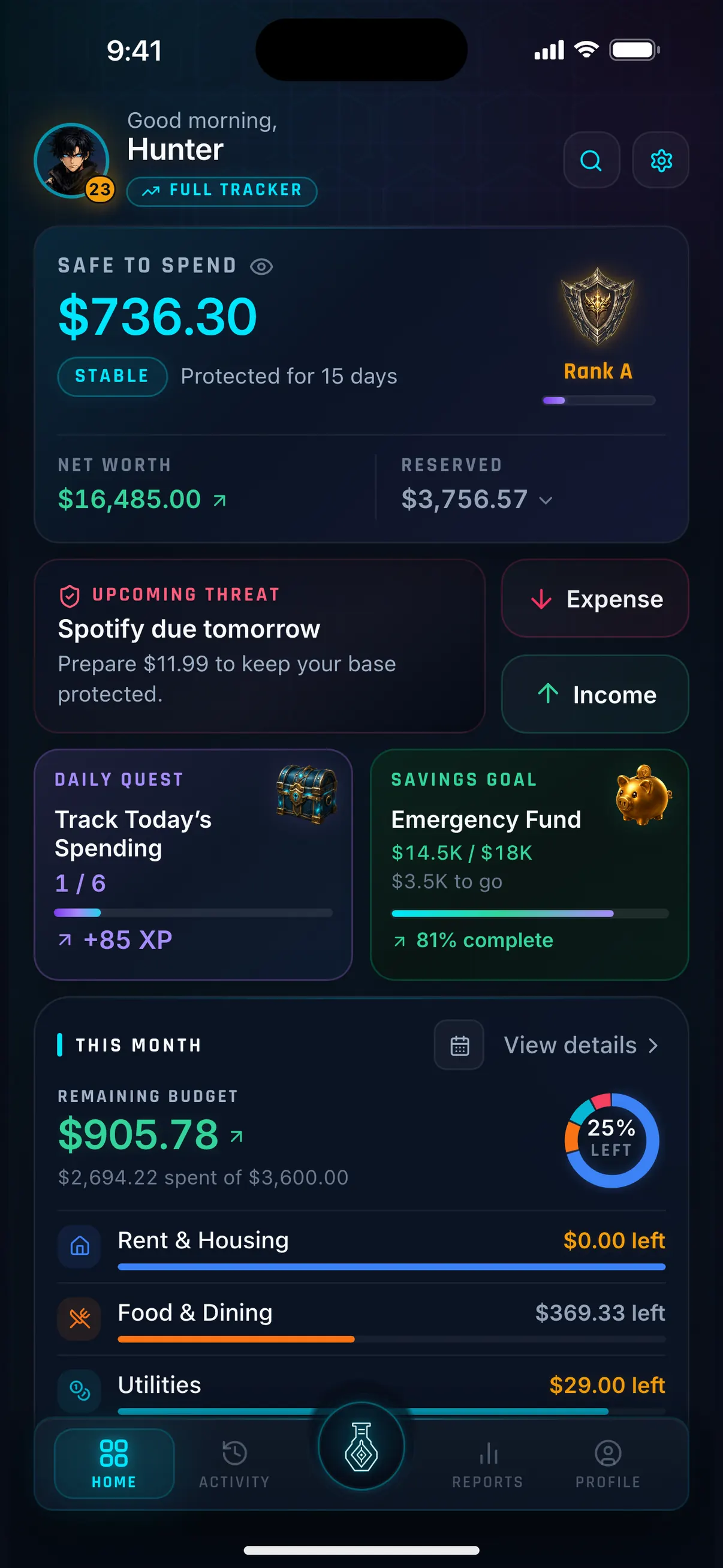
Hunter Vault turns personal finance into an RPG-style progression system. You earn XP for logging expenses, completing financial quests, reaching savings goals, and paying down debt. XP converts to levels, ranks, and titles — creating a sense of progress that purely transactional apps rarely deliver. There is no bank sync by design: every transaction is entered by you, typed in or imported from a CSV on your device, which creates engagement and awareness rather than passive monitoring.
Why we like it
- XP, levels, ranks, titles, and achievements make habit formation more engaging
- Quests tie financial actions to measurable progress
- No bank connection required — data stays on your device by default, and core budgeting works offline
- Debt tracking with visual payoff progress
- Savings goals with milestone tracking
- Free to start — core features available without a subscription
Limitations
- No bank sync — you enter transactions or import a CSV you export from your bank; no automatic bank feed
- Mobile-first — no web interface for desktop entry
- Gamification layer is not for everyone — some prefer purely functional tools
- Bank sync coverage: none
- Community and reporting features are still growing
Key details
Automatic Bank Sync vs Manual Entry
Automatic bank sync connects directly to your bank and imports transactions without you doing anything. This is convenient — you always see what you spent — but it creates a passive relationship with your money. You check; you don't engage.
Manual entry requires you to log every transaction yourself. This sounds tedious, but many users of manual-first apps report it as a feature: the act of entering a purchase creates a moment of accountability that automatic import skips entirely. Research on behavior change suggests that friction at the point of decision is often beneficial.
Hybrid approaches exist: some apps let you import bank statements as CSV or connect via read-only open banking without sharing credentials. This sits between full sync and full manual.
Which to choose: If your primary goal is accurate tracking with minimal effort, choose an app with bank sync. If your goal is to change your spending behavior and build financial awareness, manual entry or a hybrid approach often works better.
How to Choose the Right Budgeting App
The right budgeting app is the one you actually use. But some structural factors help narrow the choice:
Your budgeting style. Zero-based budgeting (YNAB) requires assigning every dollar before you spend it. Envelope budgeting (Goodbudget) pre-allocates spending by category. Spend tracking (Empower, Rocket Money) shows you where money went. Gamified budgeting (Hunter Vault) rewards the tracking habit itself.
Bank linking preference. If privacy or account security is a concern, apps that require no bank connection — Goodbudget, Hunter Vault, Monefy — are worth prioritizing. If you want effortless import, choose an app with reliable sync for your country's banks.
Pricing structure. Subscriptions add up: $15/month is $180/year. A one-time purchase or free app with fewer features may produce better financial outcomes if a subscription becomes another thing you pay but ignore.
Platform. If you spend time at a desktop, a web interface matters. If you want to log purchases the moment they happen, a polished mobile experience is more important.
Household or solo. Some apps (Monarch Money, YNAB) are designed for shared budgets. Others are primarily solo tools.
Frequently asked questions
What is the best budgeting app overall?
There is no single best app for everyone. YNAB consistently performs well for people serious about zero-based budgeting. Goodbudget is the strongest free envelope option. Hunter Vault works best for people who want gamification and manual control. The best app is the one that fits your style and that you actually open every week.
Are budgeting apps worth paying for?
A budgeting app is worth paying for if it changes your financial behavior. A $15/month subscription that helps you avoid $100/month in unnecessary spending pays for itself quickly. A $15/month subscription you open twice and forget does not. Start with a free option or trial before committing to a paid plan.
Is it safe to connect my bank account to a budgeting app?
Reputable budgeting apps use read-only connections via regulated data aggregators (Plaid in the US, Open Banking in the UK and Australia). They cannot move money. However, you are sharing your transaction history with a third party. If this concerns you, apps like Goodbudget and Hunter Vault work entirely without bank connections.
What happened to Mint?
Intuit shut down Mint in March 2024. Many former Mint users have moved to YNAB, Monarch Money, Empower, or Goodbudget depending on what features mattered most to them. If you are coming from Mint, most alternatives support CSV import of your transaction history.
Can I budget without linking my bank account?
Yes. Goodbudget, Hunter Vault, Monefy, and Wallet by BudgetBakers all work without a bank connection (Hunter Vault also imports CSV files on your device). Some apps also support bank statement import (CSV) as a middle ground between full sync and full manual. See our dedicated guide to budgeting apps without bank linking.
What is the difference between zero-based budgeting and envelope budgeting?
Zero-based budgeting (used by YNAB) means assigning every dollar of income to a specific purpose before spending, so income minus allocations equals zero. Envelope budgeting (used by Goodbudget) pre-allocates cash or digital amounts into named spending categories and stops spending when an envelope is empty. Both are proactive methods — you plan before you spend, rather than reviewing after.
More Hunter Vault guides
Level up your money
Track spending, complete quests, and build better financial habits — the RPG way. Free to start, no bank linking required.


Free to start · No account needed · Works offline