- Gamers already have the optimization mindset finance requires — the system just needs to be deliberately applied
- Start with three numbers: take-home income, total fixed expenses, and the discretionary budget left over
- A 5% gaming budget guideline keeps hobby spending in proportion without killing the hobby
- Subscription fragmentation is the biggest hidden cost — an annual audit typically surfaces $100–$300 in forgotten charges
- Sinking funds for hardware and big releases prevent budget chaos when predictable expenses land
Most personal finance advice was written for people who don’t think about stats, optimization, or long-term resource management. But if you’ve ever maintained a crafting queue, planned a raid comp, or min-maxed a character build, you already think that way.
Finance works on the same logic. Income is your gold generation rate. Fixed expenses are upkeep costs. Discretionary budget is the action economy — how you deploy remaining resources. Financial goals are endgame content.
This guide builds the complete system from the ground up: calculating your numbers, setting a gaming budget, tracking fragmented spend across platforms, auditing subscriptions, building sinking funds, defending against behavioral manipulation, and progressing toward long-term financial milestones. It’s not a tip list. It’s a playbook.
Why the Gamer Money System Works
Personal finance fails most people not because the concepts are hard — compound interest and budgeting are not complicated — but because the feedback loops are broken. You save money and nothing visible changes. You overspend and the consequence doesn’t arrive until three weeks later on a credit card statement. The gap between action and result is too wide for the brain to connect them.
Games close that gap by design. Every action produces immediate, visible feedback. Your HP bar drops. Your resource counter ticks. Your character’s level increases. That tight feedback loop is exactly why players spend hours optimizing — the system rewards attention in real time.
The Gamer Money System is built around the same principle. Instead of vague goals like “save more money,” you get explicit milestones. Instead of mentally noting that subscriptions exist, you run a structured audit. Instead of hoping you stay under budget, you pre-fund a gaming account and know exactly when it’s depleted. Every step creates a feedback loop — which is what makes any system sustainable.
There’s also a skill argument. Gamers regularly learn mechanics that rival genuine expertise. The optimization communities around Path of Exile, Factorio, and spreadsheet-driven survival games involve real mathematical sophistication. Personal finance mechanics — tax-advantaged accounts, compound interest, debt payoff order — are not more complex than most mid-tier game systems. The barrier isn’t capability; it’s that the feedback infrastructure doesn’t exist until you build it.
This guide is that infrastructure.
Step 1: Know Your Stats
You can’t optimize what you haven’t measured. Before setting any budget or making any financial decision, you need three numbers:
Take-home income — the money that actually arrives in your bank account after taxes, health insurance, and any pre-tax retirement deductions. If your income is variable (freelance, hourly, tips), use a conservative monthly average from your last three to six months. Never budget against a best-case figure — budget against a realistic floor.
Total fixed expenses — every cost that recurs monthly and isn’t optional. Rent or mortgage, utilities, renter’s/homeowner’s insurance, car payment, car insurance, minimum debt payments, phone bill, and groceries. These are your “upkeep costs” — the baseline required to keep the character alive. Write each one down with the actual amount, not an estimate. People consistently underestimate fixed costs by 15–25%.
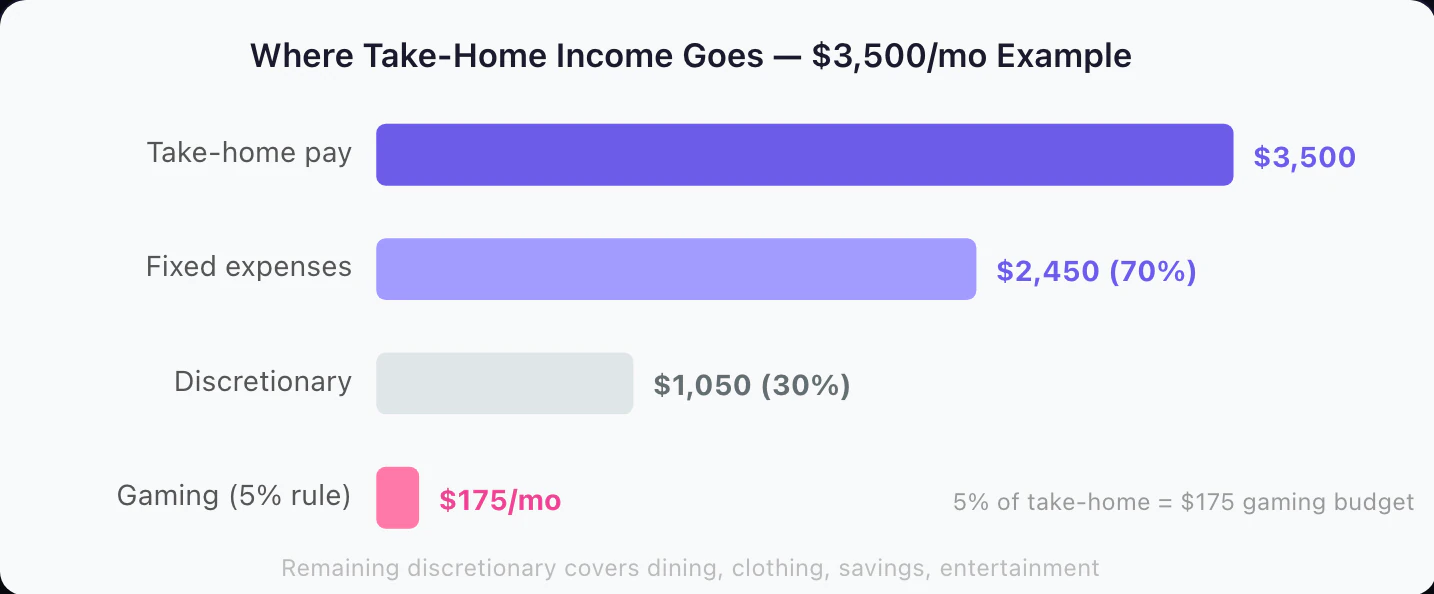
Discretionary budget — what remains after fixed expenses are subtracted from take-home:
Discretionary = Take-home pay − Fixed expenses
This is the action economy. Gaming, dining out, clothing, personal care, savings contributions, and debt overpayment all come from this pool. Most people know it exists but have never calculated it. They spend until it runs out, which is why they’re perpetually surprised by the end-of-month balance.
Once you have this number written down, you can allocate it intentionally instead of just spending until it disappears.
If you’re not certain what your fixed costs total, pull three months of bank and credit card statements before guessing. People regularly underestimate recurring costs by $200–$400/month, which makes their discretionary budget look significantly larger than it is — and explains why they consistently feel “behind.”
Step 2: Set Your Gaming Budget
With your discretionary budget calculated, gaming gets an explicit line. The question is: what’s the right amount?
The 5% rule is a widely cited starting point: keep hobby spending — including all gaming — at or below 5% of take-home pay. At $3,500/month take-home, that’s $175/month. At $2,500/month, it’s $125/month. At $5,000/month, it’s $250/month.
This isn’t a universal law or a financial planner’s recommendation. It’s a calibration anchor. The right gaming budget for you depends on whether you have an emergency fund, what debt you’re carrying, your other financial goals, and how central gaming is to your life relative to other spending categories.
Some people can reasonably spend more than 5% on gaming because they have no debt, a full emergency fund, and are already investing for retirement. Some should spend less — particularly if they’re paying off high-interest debt or saving for a near-term goal.
Alternative methods worth knowing:
The Leftover Method works well if you already have solid savings habits. Pay yourself first — savings, investments, debt overpayment — and then set a fixed gaming amount from whatever remains. This removes the debate about whether gaming fits in the budget.
The Unit Method sets a monthly limit on gaming actions rather than dollars: two new games per month, one in-game purchase per week. Simple and concrete, though it doesn’t account for price variation between a $70 AAA release and a $5 indie.
The Tiered Method separates core gaming spend (subscriptions, planned purchases) from flex spend (impulse buys, sales). The flex tier can only be used if you were under budget the previous two months — which builds in a natural save-to-spend dynamic.
Whatever method you choose, the budget needs to cover every gaming category:
- Subscriptions (PS Plus, Game Pass, Nintendo Switch Online, Apple Arcade, individual MMO fees)
- New game purchases
- DLC and expansion packs
- In-game currency, battle passes, and cosmetics
- Hardware and accessories
Understanding how different types of gaming spending work is worth doing before you finalize your number — subscriptions and in-game purchases behave very differently from one-time game purchases, and budgeting for them requires different approaches.
For a detailed walkthrough of what a realistic monthly gaming budget looks like across income levels, how much should you spend on games per month walks through the calculation with real numbers.
Step 3: Track Every Purchase
Setting a budget is step two. Tracking against it is step three — and the step most people skip, which is exactly why their budget doesn’t work.
The tracking problem for gamers is fragmentation. Gaming spend is scattered across:
- Steam and Epic Games Store
- PlayStation Store, Xbox Marketplace, Nintendo eShop
- Google Play and the App Store (for mobile)
- Amazon Gaming / Prime Gaming
- Twitch (subscriptions, bits)
- Humble Bundle, GOG, and other storefronts
- Direct purchases from indie developers
- Gaming gift cards loaded to platform wallets
None of these talk to each other. Your bank statement might say “GOOGLE *PLAY $4.99” without indicating which game triggered the charge. If you bought currency through a platform wallet pre-loaded with a gift card, there may be no bank record at all.
The fragmentation is not accidental. Platforms benefit from opacity around spending. Understanding how much gamers actually spend per year makes it clear how reliably people undercount their gaming spend — the average estimate is typically around half the actual total.
What to track:
- Every game or app purchase, regardless of price
- Every in-app purchase, including sub-dollar items
- Every subscription charge (monthly or annual)
- Every gift card loaded to a platform wallet
- Every bundle purchase
How to track effectively:
The most reliable method is logging at the moment of purchase — before you close the confirmation screen. A dedicated gaming category in a budgeting app, a simple spreadsheet with date/platform/amount/category, or even a notes app entry works. The format matters less than the consistency.
Monthly bank statement reviews are a fallback, but they miss purchases made through pre-loaded wallet balances and tend to blur individual line items into platform-level entries that don’t tell you what you bought.
If your gaming spend is concentrated in one platform or game type, a complete tracker guide for gamers covers tools and approaches specifically designed for gaming’s multi-platform reality.
Purchases under $10 are the most commonly missed in gaming budgets. A $4.99 mobile game, a $2.99 add-on, a $7.99 currency pack — individually forgettable, collectively significant. Tracking every purchase regardless of size is the only way to see the true total.
Step 4: Audit Your Subscriptions
Subscriptions are the most reliably underestimated gaming expense. They charge automatically, blend into bank statement noise, and the least-used ones tend to persist longest — because canceling requires actively noticing the charge, deciding to act, and following through with a cancellation process designed to create friction.
The annual subscription audit is a process that typically surfaces $100–$300 in unnecessary charges for people who haven’t done it recently. Run it once a year, or whenever your expenses feel higher than they should.
The audit process:
- Pull your last three months of bank and credit card statements
- List every recurring gaming and entertainment charge — all of them
- For each subscription, ask two questions: “When did I last actively use this?” and “Would I notice if it disappeared tomorrow?”
- Cancel any subscription that fails the second question
- For borderline cases, note the renewal date and set a calendar reminder to reassess before it auto-charges
Gaming subscriptions to check:
| Service | Annual cost (basic/premium) |
|---|---|
| PlayStation Plus Essential / Extra / Premium | $80 / $135 / $160 |
| Xbox Game Pass Essential / Ultimate (billed monthly) | ~$120 / ~$276 |
| Nintendo Switch Online Individual / Family | $20 / $35 |
| EA Play / EA Play Pro | $30 / $60 |
| Apple Arcade | $70 |
| Google Play Pass | $60 |
| Discord Nitro | $100 |
| Individual MMO subscriptions | $96–$180 |
Game Pass has no annual plan, so its figures are 12 months at the current US monthly prices of $9.99 (Essential) and $22.99 (Ultimate, per Xbox Wire, April 2026).
At those annual costs, a single forgotten subscription is real money. Two or three running simultaneously without active use is a meaningful budget leak that adds up to hundreds per year.
For current pricing on every major gaming subscription and a framework for deciding which ones are worth keeping at your play volume, the gaming subscription budget guide for 2026 covers each service in detail.
Step 5: Build Your Sinking Funds
A sinking fund is a savings bucket for a predictable future expense. Instead of absorbing a large cost all at once, you spread it across months of small contributions, so the purchase never lands as a budget shock.
Gaming expenses are unusually predictable, which makes them natural sinking fund targets:
- Hardware fund for the next GPU, console, or PC upgrade
- New release fund for the games you already know you’ll buy this year
- Renewal fund for subscriptions billed annually (divide each renewal by 12 and set that aside monthly)
- Gear maintenance buffer for the controller or headset that eventually dies
What makes this work is specificity. A named, earmarked fund (“Gaming PC Fund”) is psychologically harder to raid for groceries than the same balance sitting in general savings.
For setup, how many funds to run, and how to manage them alongside other goals, see what is a sinking fund. For the full target-setting and timeline math on a hardware purchase, including what to do when GPU prices move mid-save, how to save for a gaming PC walks through it step by step.
Step 6: Apply Behavioral Defenses
The budget is set. Tracking is running. Sinking funds are building. Now comes the part most budget guides skip: the psychological layer.
Modern games are engineered to trigger spending. This isn’t a side effect of the business model — it is the business model for most free-to-play and live service games. Variable reward schedules, artificial scarcity, social comparison pressure, and time-limited offers are embedded by design teams whose explicit job is to maximize conversion and average revenue per user.
You’re not fighting a bug in your personality. You’re up against deliberate engineering. The defenses below work not because they require extraordinary willpower, but because they create rules that operate automatically — rules that don’t require you to make a decision in a high-pressure moment.
The 48-Hour Rule — When you feel the pull to make an in-game purchase or impulse-buy a game, add it to a wishlist or cart and wait 48 hours. Don’t buy. Just wait. The urgency that feels overwhelming in the moment dissolves reliably over two days. Most of these items don’t get purchased after the cooling-off period — not because you forgot, but because the urgency was manufactured and it fades.
The Real Currency Conversion — In-game currencies (V-Bucks, coins, gems, crystals) are specifically designed to create distance between you and the perception of spending real money. Before any currency pack purchase, convert it back: “This is $14.99 for 1,500 gems.” Say it out loud if it helps. The emotional response to “$14.99” is meaningfully different from “1,500 gems,” and the difference is the entire point of the abstraction.
The Loot Box Math — If you’re chasing a specific item through RNG monetization, calculate the expected cost before you start. If the drop rate is 2% and each pull costs $2, the expected cost to hit a specific item is $100 — not $2. In gacha games with pity systems, the guaranteed cost is the real price floor. Doing the math before spending reveals costs that look very different from the per-pull price. For a full breakdown of gacha-specific strategies, how to stop overspending on gacha games covers the probability math and spending frameworks.
The Budget Envelope — Load a fixed amount of money onto a gaming gift card or store credit each month. When it’s depleted, gaming spending pauses until the next month’s reload. This converts an abstract budget number into a concrete physical constraint, removing the need to make a decision each time you want to spend.
The “One In, One Out” Rule — Every time you add a gaming subscription, cancel one you already have. This prevents subscription stack creep without requiring you to constantly audit. The rule is self-enforcing.
Limited-Time Offer Skepticism — “Only 24 hours left!” is one of the most common manipulation tactics in gaming monetization. True limited-time exclusives are rare; most items return in rotation. The safe default is to treat all urgency language as a signal to slow down, not speed up. If an item is genuinely gone forever after 24 hours, waiting to think about it costs you nothing. If it comes back (which it usually does), waiting saved you money.
The Recurring Audit — Set a quarterly calendar reminder to review your gaming spend against your budget. Quarterly is often enough to catch drift before it becomes a pattern. If you’ve been consistently over budget for two months, that’s a data point — either the budget needs adjusting or the spending pattern does.
Understanding why gaming spending escalates beyond what you planned covers the behavioral mechanics in more depth, including why the “just this once” framing is particularly dangerous in games with social pressure mechanics.
Step 7: Level Up Over Time
A gaming budget and tracking system handles the daily and monthly picture. But personal finance has endgame content — milestones that qualitatively change your financial situation over time, not just your monthly numbers.
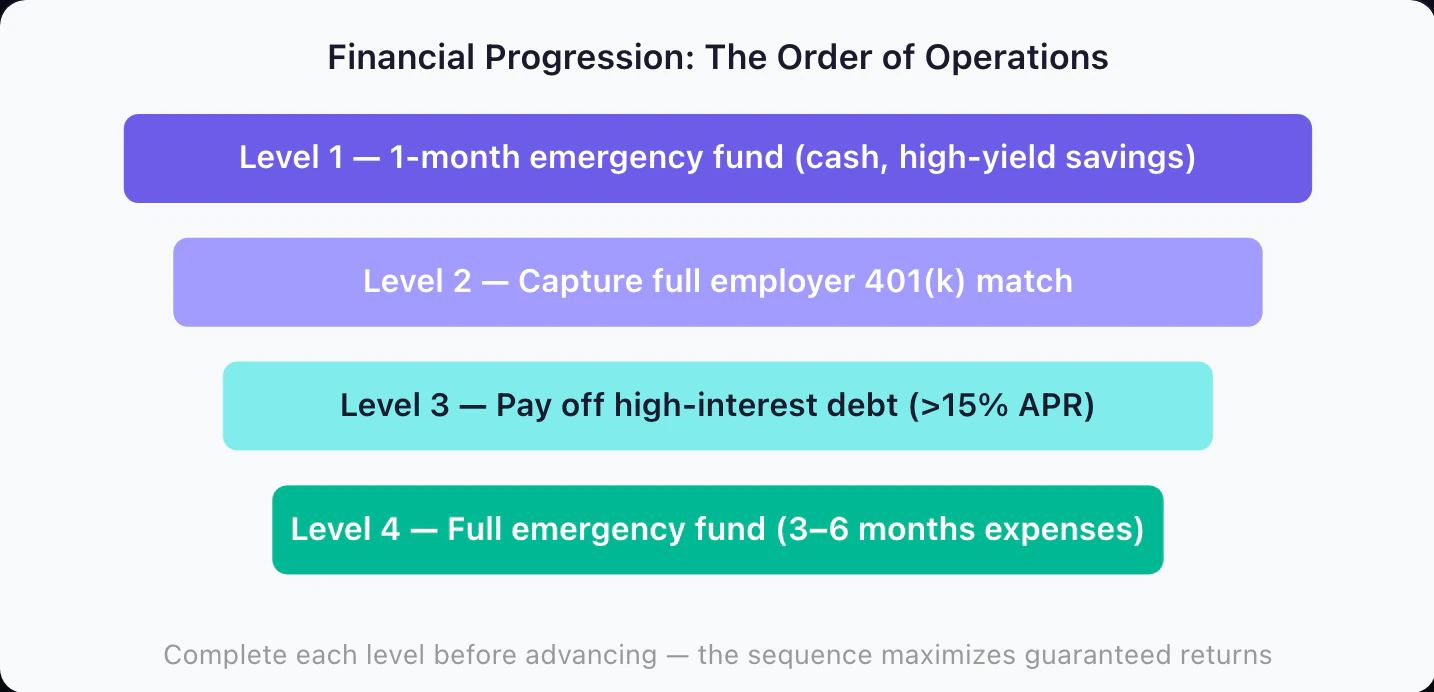
Level 1: The Starter Emergency Fund — Before aggressively paying down moderate-rate debt or investing, build one month of essential expenses in a savings account. This is your death-prevention fund. It converts unexpected expenses — a car repair, a medical bill, a vet visit — from debt events into cash events. Without it, one bad month can undo months of financial progress.
Level 2: Capture the Employer Match — If your employer offers a 401(k) or retirement match, contribute at least enough to receive the full match before paying extra on any debt except high-interest cards. A 50% match is a guaranteed 50% return on that contribution. No investment reliably produces returns that good. This is the single highest-ROI financial action available to most employed people.
Level 3: Eliminate High-Interest Debt — Credit card debt above 15–20% APR is a mathematical emergency. Carrying a $3,000 balance at 22% APR costs $660/year in interest — more than most people can reliably earn through investing. Once the employer match is captured, directing discretionary resources toward high-interest debt produces guaranteed, risk-free returns.
Level 4: Full Emergency Fund — With high-interest debt cleared, build the emergency fund to three to six months of essential expenses. This is what separates “managing” from “stable.” A full emergency fund means a job loss or major expense doesn’t require selling investments, taking on debt, or upending a financial plan.
Level 5: Invest — With the emergency fund complete, high-interest debt cleared, and employer match captured, the remaining step is systematic investing. For most people, a Roth IRA funded with low-cost index funds (total market or S&P 500) is the lowest-complexity, highest-efficiency starting point. The 2026 IRA contribution limit is $7,500/year, plus a $1,100 catch-up if you’re 50 or older (IRS).
The sequence matters because returns at each level are different. A 100% employer match beats a 10% market return. Eliminating 22% APR debt beats a 7% investment return. Doing them out of order means leaving guaranteed money on the table.
For the behavioral layer — why financial habits form and how to make them automatic rather than effortful — the guide to building money habits that stick covers the habit formation science applied to personal finance.
Putting the System Together
This is the full playbook in sequence:
Step 1 — Know your stats. Calculate take-home income, total fixed expenses, and the discretionary budget remaining.
Step 2 — Set your gaming budget. Use 5% of take-home as a starting point, then adjust based on your debt situation, savings status, and other financial priorities. Cover all categories: subscriptions, games, DLC, in-game purchases, and accessories.
Step 3 — Track every purchase. Log all gaming spend at the time of purchase, across all platforms. Monthly reviews catch most things; real-time logging catches everything.
Step 4 — Run an annual subscription audit. Pull three months of statements, list every recurring charge, and cancel anything you wouldn’t actively miss. Expect to find $100–$300 in cuts.
Step 5 — Build sinking funds. Hardware fund, new release fund, annual subscription fund. Named, earmarked, and funded monthly so large purchases don’t hit the budget as a surprise.
Step 6 — Apply behavioral defenses. 48-hour rule for impulse purchases, real currency conversion before buying packs, budget envelope for discretionary gaming spend, one-in-one-out for subscriptions.
Step 7 — Progress toward financial milestones. Emergency fund, employer match, high-interest debt, full emergency fund, investing.
You don’t implement all seven steps simultaneously. Start with Steps 1 and 2 — knowing your numbers and setting an explicit gaming budget. Everything else becomes clearer once you have a baseline.
Conclusion: The Main Quest Starts Here
The skills required to manage personal finance effectively — optimization, resource management, long-term planning, learning from failure — are the same skills games have been building in you every time you engaged seriously with a complex system. The gap isn’t capability. It’s the absence of a financial system designed to work with those skills.
This guide is the main quest. The resources below go deeper on specific mechanics:
- How much should you spend on games per month? — the gaming budget decision with real numbers
- How gamers can track and control spending — tools and methods for tracking fragmented spend
- Gaming subscription budget for 2026 — every major service with current pricing
- How to save for a gaming PC — sinking fund mechanics for hardware purchases
- How to stop overspending on gacha games — probability math and spending frameworks for gacha
- How to budget for gaming without quitting — behavioral approaches to sustainable gaming spend
- What is a sinking fund? — the mechanics of earmarked savings
- How to build money habits that stick — habit formation applied to financial behavior
- How to budget for gaming spending types — subscriptions vs. purchases vs. in-game spend
- The gamer’s guide to financial mindset — the psychology layer: why gamers are built for financial success
This guide is general educational content. It’s not personalized financial advice. Your specific income, obligations, debt, and goals should drive your financial decisions. For personalized guidance, consider a certified financial planner.
Frequently Asked Questions
How much of my income should I spend on gaming?
A common guideline is to keep gaming spend within 5% of your monthly take-home pay. On a $3,500/month take-home, that's $175/month or $2,100/year. If you're still building an emergency fund or carrying high-interest debt, many financial planners suggest 3% or less until you clear those milestones. The 5% figure isn't a rule — it's a starting calibration point you adjust based on your actual situation.
What is the best way to track gaming spending across multiple platforms?
The core challenge is fragmentation — Steam, PlayStation Store, Xbox, Nintendo eShop, Google Play, the App Store, and individual game storefronts are all separate accounts that don't communicate. The most reliable method is logging every gaming purchase in a single place at the moment of purchase, including small in-app items. Monthly bank statement reviews catch most things but miss purchases you made with stored wallet balances.
What is a gaming sinking fund?
A sinking fund is money set aside monthly for a known future expense. A gaming sinking fund might target a new GPU, a console, annual subscription renewals, or a lineup of big releases. Instead of absorbing a $500 hit when it arrives, you've been building it up with small monthly contributions. The key is that the fund is earmarked — named and separate from general savings — which prevents the money from being redirected.
How do I stop impulse buying games and in-game items?
A 48-hour rule works well: put the item in a wishlist or cart but don't buy for 48 hours. Many purchases that felt urgent in a FOMO moment lose their appeal once the urgency fades. For in-game currency packs, translating the cost back to real dollars before clicking buy also meaningfully reduces unplanned spending.
When should I start investing instead of just budgeting?
The standard order of operations: (1) 1-month emergency fund, (2) capture any employer 401(k) match, (3) pay off high-interest debt above roughly 7–10% APR, (4) build a 3–6 month emergency fund, (5) invest in a Roth IRA or index funds. You don't wait until debt is completely gone to start step 2 — the employer match is often a 50–100% instant return that no investment can reliably beat.
Does Hunter Vault work for tracking gaming spending across platforms?
Yes, as long as you log your purchases. Hunter Vault is a general manual budgeting app with gamification (quests, XP, streaks), not a gaming-only tool. You can name your own categories, such as subscriptions, battle passes, in-game purchases, hardware, and game purchases, and log each purchase from any platform in one place. It doesn't connect to your bank or to game stores, so nothing is imported automatically from Steam, PlayStation, or other storefronts.