Hunter Vault Cloud backs up your entire financial history to the cloud and keeps every device current — incrementally, atomically, and with conflict resolution that never silently discards a record.
Cloud sync that handles the edge cases you don't want to think about.
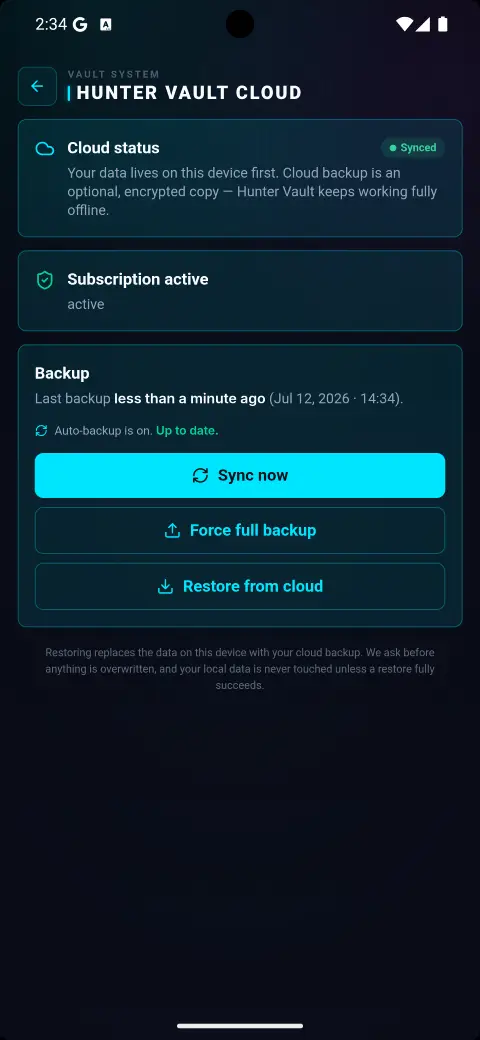
Upload a full snapshot of your local database to the cloud whenever you want. One tap — your entire financial history is preserved off-device.
Download your cloud snapshot and atomically replace your local data. All cloud data is fetched before any local write — if anything fails, the restore rolls back completely.
After your first backup, incremental sync runs automatically in the background. Only records that changed since the last sync watermark are sent — not your whole database every time.
Changes on any device flow to the cloud and then to your other devices. Conflict resolution is record-level last-write-wins — the freshest update always wins, with tie-breaking toward local.
When you delete a record, a tombstone is recorded locally, synced to the cloud, and applied on your other devices. Deletes don't get silently resurrected the next time you sync.
Your Hunter Vault data is yours — every expense logged, every quest cleared. Losing a phone or switching devices shouldn't mean starting over. Cloud Sync backs everything up on demand and keeps all your devices current automatically.

When you enable Cloud Sync for the first time, Hunter Vault checks whether the cloud already holds data. Cloud empty — your device uploads automatically. Cloud has data — you choose: restore the cloud to this device, replace the cloud with this device, or cancel. No silent merges.

A status indicator lives in the app layout whenever you're subscribed — a quick glance tells you whether everything is current. Offline edits still accumulate locally and sync automatically when you're back online, with exponential backoff if the first attempt fails.

Cloud Sync covers all 19 financial and gamification tables — expenses, income, budgets, goals, debt, vaults, quests, achievements, streaks, and more. A two-pass foreign-key translation handles circular references between records, so nothing arrives on a new device in a broken state. The Weekly Hunter Leaderboard uses its own sync path and is not part of the cloud snapshot.

Cloud sync is opt-in and always reversible. Your local data is never affected until you choose to restore. You can disable sync and all cloud data is removed.
Hunter Vault Cloud is an optional premium feature that backs up your data to the cloud and syncs it across all your devices. Your local data always stays on your device — cloud sync is purely additive and can be turned off at any time.
After your first manual backup, auto-sync runs in the background whenever you make changes, you're signed in, subscribed, and online. Changes are debounced and synced incrementally — only what changed, not your entire database.
Sign in on your new device, go to Profile → Data & Sync → Cloud Backup, and restore your cloud snapshot. Your full database — all 19 tables of financial and gamification data — is downloaded and applied atomically. If anything goes wrong, the restore rolls back automatically.
Hunter Vault uses last-write-wins conflict resolution at the record level, based on the updatedAt timestamp. If both edits happen at the exact same millisecond, the local device wins. Losing snapshots are logged server-side so nothing is silently discarded.
All 19 financial and gamification tables are included — expenses, income, budgets, goals, debt, vaults, quests, achievements, streaks, and more. Your hunter name, currency, notification preferences, and UI flags are also backed up. Leaderboard tables use their own sync path and are kept separate.
No. Hunter Vault is fully offline and local by default. Cloud sync is a premium add-on for hunters who want multi-device access or an off-device backup. Everything works without it.
Hunter Vault Cloud is available on Hunter Elite — premium access built for hunters who want their data safe and everywhere they go.