Best Budgeting Apps That Don't Link to Your Bank Account
If you want an app that never connects to a bank at all, Bluecoins, Hunter Vault, Monefy and Money Manager by Realbyte work entirely by hand, and so does Actual Budget unless you set up its optional sync server. Goodbudget, EveryDollar, YNAB and Wallet by BudgetBakers also work fully without a bank, but offer bank sync as an option (on paid plans for Goodbudget, EveryDollar and Wallet). Below, each app is compared on what it does without a bank, what it costs and who it suits — including people who don't have a bank account at all.
On this page
Our picks for different budgeters
Side-by-side comparison
| App | Best for | Price | Bank sync | Manual entry | Debt tracking | Savings goals | Platforms | Data stored | Account to start | File import | Ads (free version) |
|---|---|---|---|---|---|---|---|---|---|---|---|
| Hunter Vault Our app | Full manual budgeting with gamification | Free; Awakened Hunter $15.99 one-time; optional subscriptions | No — never | Yes | Yes | Yes | iOS, Android | On your device (paid cloud sync optional) | No | CSV (free, on device) | No |
| Bluecoins | Never-linked tracking with full accounts | Free (ads) / one-time Premium | No — never | Yes | Yes (cards, loans, debts) | Not listed | Android, iOS | On your phone (Premium: backup to your own cloud) | No | CSV, QIF | Yes (Premium removes) |
| Actual Budget | Free, open-source envelope budgeting | Free (hosting extra if you sync) | Optional, only via a server you host | Yes | Via off-budget accounts | Goal templates (experimental) | Windows, Mac, Linux, web | On your device, or a server you host | No | CSV, OFX, QFX, QIF, YNAB | No |
| Monefy | Quick minimal expense logging | Free / Premium in-app (varies) | No | Yes | No | No | iOS, Android | On your device (optional backup to your own cloud) | No | Not confirmed | No ad label in the stores |
| Money Manager (Realbyte) | Detailed accounts-based manual tracking | Free with ads / $5.99 remove-ads (iOS) | No | Yes | Via accounts | Limited | iOS, Android | On your device (paid sync optional) | Not stated | Excel backup and restore | Yes |
| Goodbudget | Envelope budgeting, household sharing | Free / $10/mo or $80/yr | Premium only (US banks) | Yes | Limited | Via envelopes | iOS, Android, Web | Cloud | Yes | OFX, QFX, CSV (web) | No |
| EveryDollar (free plan) | Free zero-based budgeting | Free / $17.99/mo or $79.99/yr | Premium only | Yes | Premium only | Sinking funds | iOS, Android, Web | Cloud | Yes | None | No |
| YNAB (manual mode) | Zero-based budgeting method | USD $14.99/mo or $109/yr | Optional — works without | Yes | Yes | Yes | iOS, Android, Web | Cloud | Yes | CSV, OFX, QFX, QIF (web or iPad) | No |
| Wallet by BudgetBakers | Multi-account manual tracking | Free / Premium (varies) | Optional Premium feature | Yes | Yes | Yes | iOS, Android, Web | Cloud | Yes | CSV, XLS, OFX | No |
More details
More details
More details
More details
More details
More details
More details
More details
More details
Table last reviewed October 2026. Verify current pricing and features with each app's website — details may change.
How we evaluated these apps
We score every app against the same criteria, so the recommendations stay consistent and comparable.
Whether every core feature works with no bank connection, and whether bank sync is absent, optional or paid.
On your device, in your own cloud drive, on a server you host, or in the developer's cloud.
Whether you can open the app and start logging without creating an account.
Which file formats (CSV, OFX, QFX, QIF) you can import instead of linking a bank.
Budgets, debt tracking and savings goals — not just a list of expenses.
Ads in the free version, what the paid plan costs, and whether it is a subscription or a one-time purchase.
App-by-app breakdown

Hunter Vault Our app
Best for Full budgeting without any bank account access
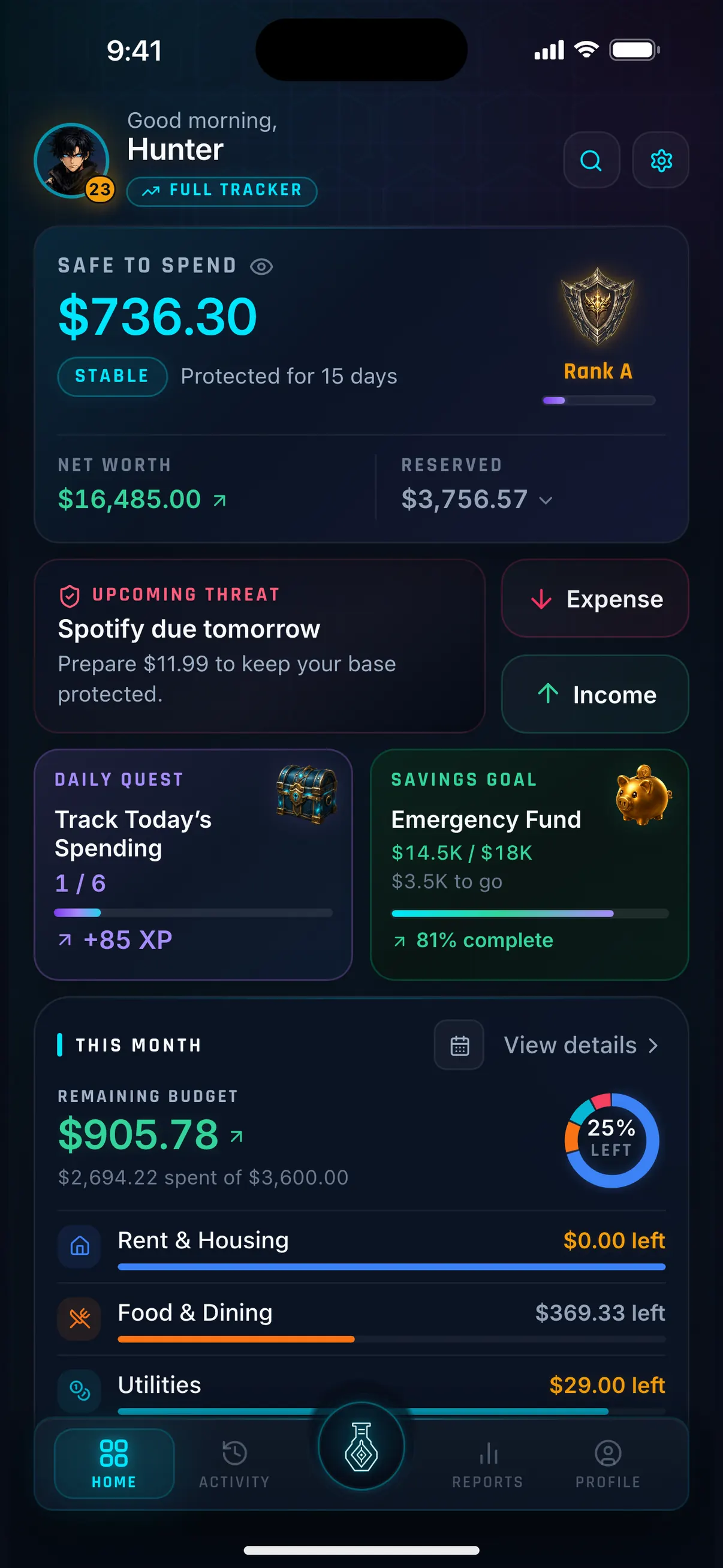
Hunter Vault is our own app. We're not neutral reviewers on this one — but it was built specifically to answer the question of whether a full-featured budgeting app can exist without ever needing your bank credentials. Expenses, budgets, savings goals, debt tracking, recurring bills, and gamified progression — all without a bank connection of any kind.
Why we like it
- Zero bank access — by design, not as an afterthought
- No account required to start — open the app and log your first expense
- Budgeting, tracking, quests and reports work fully offline; only optional online features need a connection
- Gamified progression: quests, XP, levels, ranks, achievements, streaks
- Full feature set: expense tracking, budgeting, savings goals (vaults), debt tracking, recurring bills, reports
- Free to start; Awakened Hunter is a one-time purchase — no subscription required
Limitations
- You log most expenses yourself — it requires a habit, not just a download
- No bank feed — enter transactions or import a CSV (free, on your device); screenshot and PDF Smart Import needs Hunter Pass
- Household sharing needs a Shared Vault subscription (the owner pays; up to 5 others join free)
Key details
Bluecoins
Best for Never-linked budgeting with every account on your phone
Bluecoins never connects to a bank: its developer says it "never logs into your bank and never stores bank credentials", and there is no Bluecoins account to sign up for. Transactions, accounts and budgets live in a local database on your phone. It tracks cash, bank accounts, credit cards, loans and debts with budgets and charts. The free version has ads; a one-time Premium upgrade removes them and adds backup and sync through your own Google Drive, Dropbox or OneDrive, plus automatic logging from bank SMS and notifications.
Why we like it
- Never connects to a bank, and there is no account to create
- Data stays in a local database on your phone
- Tracks credit cards, loans and debts alongside cash and bank accounts
- CSV and QIF import
- Premium is a one-time purchase, not a subscription
Limitations
- Free version has ads
- Phone only — no web or desktop version
- Backup and sync to your own cloud drive need Premium
- Premium auto-logging works by reading your bank SMS and notifications, which some privacy-minded users may not want to allow
Key details
Actual Budget
Best for Free, open-source envelope budgeting with no sign-up
Actual Budget is free, open-source software built on envelope budgeting. It is local-first: without a sync server, your budget stays in the desktop app or your browser and there is nothing to sign up for. If you want sync across devices, you run your own server (or pay a host such as PikaPods), and only then can you add optional bank sync through services like SimpleFIN in North America. It imports CSV, OFX, QFX and QIF files, plus YNAB budgets. The trade-off is setup: there is no native phone app, and using it on several devices means hosting a server.
Why we like it
- Free and open source, with no ads
- Local-first: no sign-up, and data stays on your device unless you run a sync server
- Envelope budgeting, with category goal templates (experimental)
- Imports CSV, OFX, QFX and QIF files, plus YNAB budgets
- Off-budget accounts for tracking things like mortgages and investments
Limitations
- No native phone app — on mobile it runs as an installable web app
- Syncing between devices means running your own server or paying a host
- Bank sync is only available through a server you host
- More setup than a download-and-go app
Key details
Monefy
Best for Fast, minimal cash and expense logging
Monefy is a simple expense tracker with a visual spending wheel. Tap a category icon, enter an amount — done. There is no bank sync at all. It does not have savings goals, debt tracking, or income budgeting. If your only need is to log daily spending quickly with minimal friction, Monefy is one of the fastest tools for that task.
Why we like it
- Extremely fast to log a single expense — a few taps
- No account or bank connection required
- Works offline
- Visual spending wheel is intuitive
Limitations
- No savings goals, debt tracking, or recurring bills
- No income budgeting — just expense categories
- Minimal reporting beyond spending totals
Key details
Money Manager (Realbyte)
Best for Detailed, accounts-based manual tracking with no bank connection
Money Manager by Realbyte is a fully manual tracker — no bank linking anywhere — built on a double-entry, accounts-and-assets model with strong charts and PC/Excel export. For people who want accounting-grade detail while keeping everything on their own device, it is one of the most capable no-sync options. The trade-off is ads on the free tier and a steeper model than casual trackers.
Why we like it
- Fully manual — no bank connection required or offered in most regions
- Detailed double-entry accounting with accounts and assets
- Strong charts, reports, and PC/Excel export
- Budgets and recurring transactions
- Large, long-established user base
Limitations
- Free version is ad-supported — users report ads persisting after paying to remove them
- Remove-ads and paid features can re-charge on a new device
- Double-entry model is heavier than many people need
- No savings-goal or motivation layer
- Mobile-first — desktop only via export
Key details
Goodbudget
Best for Envelope budgeting with household sharing
Goodbudget uses the envelope method — you divide your income into labeled spending categories and spend from each 'envelope' until it's empty. The free plan requires manual transaction entry with no bank connection. The Premium plan optionally adds bank sync, but it is not required.
Why we like it
- Free plan works without any bank connection
- Envelope method is intuitive and effective for income-based budgeting
- Household sharing — great for couples managing a joint budget
- Web access for desktop budgeting
- Imports OFX, QFX and CSV files on the web
Limitations
- Free plan limits envelopes and devices
- Premium priced in USD
- Less visual progress tracking compared to gamified apps
- Limited debt payoff tools
Key details
EveryDollar (free plan)
Best for Free zero-based budgeting with manual entry
EveryDollar is Ramsey Solutions' zero-based budgeting app: you plan where every dollar goes before you spend it. The free version is manual — you build a monthly budget with unlimited categories, enter transactions yourself and set up sinking funds. Connecting a bank is a Premium feature, along with custom reports, goal tracking and a debt snowball payoff tracker. You need an account to use it, and there is no file import, so on the free plan you type in every transaction.
Why we like it
- Free version is fully manual — no bank needed
- Zero-based budgeting with unlimited categories
- Sinking funds for planned expenses on the free plan
- Works on iOS, Android and the web
- No ads
Limitations
- Account required to start
- No file import — on the free plan every transaction is typed in
- Debt payoff tracker and goal tracking are Premium only
- Premium is $17.99/month or $79.99/year
Key details
YNAB (manual entry mode)
Best for Zero-based budgeting method without requiring bank sync
YNAB's core method — giving every dollar a job before you spend it — works entirely via manual entry. Bank sync in YNAB is optional, not required. Many YNAB users manually enter every transaction deliberately, treating it as a mindful financial practice rather than an automation task. The subscription cost is the main barrier.
Why we like it
- Full zero-based budgeting method works entirely without bank sync
- Powerful debt payoff and savings goal features
- Family sharing for up to six people
- 34-day free trial
- Large community and learning resources
Limitations
- USD subscription required after trial — no permanent free tier
- Significant learning curve for the method
- Paying a subscription for manual entry feels like a steep price to some users
Key details
Wallet by BudgetBakers
Best for Multi-account manual tracking with optional bank sync
Wallet supports multiple accounts — cash, cards, savings — and lets you manually enter transactions against each. Bank sync is available on premium plans but not required. It has more structure than Monefy but less gamification than Hunter Vault. A reasonable middle ground for users who want comprehensive manual tracking without committing to a bank connection.
Why we like it
- Multi-account support for cash, cards, and savings
- Manual entry works well without bank sync
- Debt tracking and savings goals available
- Reports across accounts
Limitations
- Full feature set requires a paid plan
- Interface can feel cluttered
- An account is required to start, and your data is stored in the cloud
Key details
Context and considerations
Why some people avoid bank linking
Connecting a budgeting app to your bank account involves giving a third party — usually an aggregation service like Plaid, TrueLayer, or a regional equivalent — read access to your transactions. Reasons people choose not to do this include:
Security: Even read-only access means a breach at the aggregator level could expose your transaction history. Some users are not comfortable with this, regardless of stated security practices.
Privacy: Your spending data is detailed personal information. Some users prefer to keep it on their own device. For a privacy-focused comparison, see our guide to privacy-friendly expense trackers that don't need bank access.
Bank terms: Older aggregation methods sign in with your actual bank username and password, which may conflict with some banks' terms. Regulated Open Banking (UK, Australia) avoids this by using bank-approved access instead of your login.
International users: In many countries, local banks and e-wallets are not supported by sync services at all. For many users in the Philippines, Indonesia or much of Africa, manual entry is often the only practical option.
Deliberate tracking: Typing in each purchase makes you notice it in a way an automatic feed doesn't — tapping in a ₱350 food delivery order or a $6 coffee yourself registers the spending. Some users choose manual entry for this reason even when bank sync is available.
None of these reasons make bank linking wrong — it is a useful feature. But manual-first apps are not just a fallback; for many users they are the right choice.
No bank account at all? What works
Some people searching for a budgeting app "without a bank account" don't have one — not just a preference against linking it. Every app on this list works with cash, because none of them needs a bank to function.
Where cash and e-wallets are still common — the Philippines, much of Southeast Asia, parts of Africa and Latin America — this is the everyday reality anyway. No app can automatically track a market purchase, a jeepney fare, or a sari-sari store expense.
How to set it up: create a Cash account (and one for each e-wallet, such as GCash or Maya) and enter its starting balance. Record a transfer when you top up or withdraw, then log each spend against the right account, so your tracked balance matches what's in your wallet. To work out how much of that cash you can spend before your next payday, try the free Safe-to-Spend calculator.
Sign-up: Actual Budget, Bluecoins, Hunter Vault and Monefy start without creating an account. EveryDollar, YNAB and Wallet ask you to sign up with an email address, but none of these apps needs a bank.
Staying accurate with reconciliation
The one discipline manual budgeters develop is reconciliation — periodically comparing the balance your app shows against the real balance in your wallet or bank. In Hunter Vault you adjust account balances manually; in YNAB reconciliation is built into the workflow; in Goodbudget the envelope balances act as a proxy. A quick weekly or monthly reconciliation catches missed entries and keeps the whole budget trustworthy.
Manual, import, and automatic: what each approach means
Automatic bank syncing: An app connects to your bank via an aggregator (Plaid, TrueLayer, etc.) or regulated API (Open Banking). Transactions appear automatically. Convenient, but requires giving third-party read access to your account.
Manual entry: You log each transaction as it happens. Requires a daily habit. Gives you complete control over your data. Apps on this list all support this.
CSV / statement import: You export a transaction file from your bank's online portal and import it into the budgeting app. A middle ground — periodic rather than continuous, no third-party read access needed. Most apps here support it: Actual Budget (CSV, OFX, QFX, QIF and YNAB budgets), Bluecoins (CSV and QIF), Goodbudget (OFX, QFX and CSV on the web), YNAB (on the web or iPad), Wallet by BudgetBakers, and Hunter Vault (CSV, free, on your device). EveryDollar has no file import. For a closer look at import-first apps, see budget apps that import transactions without bank sync.
Hybrid: Some apps let you use manual entry for some accounts and bank sync for others. YNAB supports this — you can have a manually-managed cash account alongside a synced bank account.
Hunter Vault never connects to a bank, by design: log transactions yourself or import a CSV, across multiple accounts (cash, GCash, savings). See how its private, offline budgeting works.
How to choose a budgeting app without bank linking
What does "without bank linking" mean for you?
- Do you want to avoid it entirely? Bluecoins, Hunter Vault, Monefy and Money Manager never connect to a bank, and Actual Budget only can through a server you host.
- Or is it fine as an option you never turn on? Goodbudget, EveryDollar, YNAB and Wallet by BudgetBakers all work fully by hand.
Do you need gamified motivation? If previous budgeting apps failed because you lost interest, gamification — quests, XP, streaks — can provide the daily reinforcement that pure tracking apps do not. Hunter Vault is built around this.
Do you budget alone or with a partner? Goodbudget includes household sharing even on its free plan, and YNAB's subscription covers up to six people. Hunter Vault's Shared Vault also covers up to six, with a subscription for the owner (the people they invite join free).
Do you need debt tracking? YNAB and Hunter Vault have debt payoff tools, and EveryDollar has a debt snowball tracker on Premium. Bluecoins and Money Manager track debts as accounts, Goodbudget's are limited, and Monefy has none.
Do you want savings goals? Hunter Vault, YNAB, and Wallet by BudgetBakers all support savings goals. EveryDollar's free plan has sinking funds, Goodbudget handles goals through envelopes, and Actual Budget has experimental goal templates.
Free or paid? Actual Budget is free and open source. Hunter Vault's free tier covers core budgeting (with the limits above), and the free plans of Goodbudget and EveryDollar are fully usable by hand. Bluecoins and Money Manager are free with ads. YNAB requires a subscription.
Frequently asked questions
What is the best budgeting app that does not require bank linking?
It depends on what you need. Apps that never connect to a bank at all include Bluecoins, Hunter Vault (our app), Monefy and Money Manager by Realbyte, and Actual Budget only syncs with banks through a server you host. Goodbudget's and EveryDollar's free plans are fully manual, and YNAB works without bank sync but needs a subscription.
Can I use YNAB without linking my bank?
Yes. YNAB's zero-based budgeting method works entirely via manual transaction entry — bank sync is optional. Many YNAB users deliberately choose manual entry. The subscription cost applies regardless of whether you use bank sync.
Are budgeting apps without bank linking less useful?
Not necessarily. Manual entry apps provide full budgeting functionality, and many people find that typing in each purchase makes them more aware of their spending than an automatic feed does. The practical limitation is that manual entry requires a daily habit to be effective.
Which budgeting apps work offline without an account?
Hunter Vault's budgeting works fully offline, and it doesn't require an account to start. You can open the app and log your first expense immediately, with no signup or internet connection. Bluecoins and Monefy also work offline without an account, and Actual Budget keeps your budget on your computer or in your browser with no sign-up.
What is the difference between bank syncing and CSV import?
Bank syncing gives an app continuous, read access to your transaction data through an aggregation service or open banking API — automatic, real time. CSV import is a one-time manual step: you export your transaction history from your bank's website as a file, then import it into the app. CSV import requires no ongoing bank access — you control when and whether data is shared.
Is Hunter Vault really free without bank linking?
Yes. Hunter Vault's free tier includes expense tracking, budgets, savings goals, debt tracking, recurring bills, quests, XP, and ranks — all without requiring a bank connection or creating an account. Free limits: up to 8 budgets, 3 recurring entries, 5 accounts, 3 debts, 2 savings goals. Awakened Hunter ($15.99 USD one-time) removes those limits.
What is the best free manual budgeting app?
Hunter Vault (our app) has a broad free tier for manual budgeting — expense tracking, budgets, savings goals, debt tracking, recurring bills, quests, and XP are all usable without paying, within free-tier limits. Actual Budget is completely free and open source if you don't mind some setup. Goodbudget's free plan is solid for envelope budgeting, EveryDollar's free plan covers zero-based budgeting, and Monefy's free version works for simple expense logging but has no budgeting features.
How do I track cash expenses in a manual budgeting app?
Create a 'Cash' account and log cash purchases against it. When you withdraw cash from your bank, record a transfer from the bank account to the cash account; when you spend, log it as an expense from the cash account. This keeps your tracked balance accurate. Hunter Vault, YNAB, and Goodbudget all support this approach.
Can I use a budgeting app if I don't have a bank account?
Yes. Manual budgeting apps don't need a bank at all: you log cash and e-wallet spending yourself. Create a Cash account (and one for each e-wallet, such as GCash or Maya), enter your starting balance, and record each purchase. Actual Budget, Bluecoins, Hunter Vault and Monefy start without an account; EveryDollar, YNAB and Wallet need an email sign-up, but no bank.
More Hunter Vault guides
Level up your money
Track spending, complete quests, and build better financial habits — the RPG way. Free to start, no bank linking required.


Free to start · No account needed · Works offline