Best Free Budgeting Apps in 2026
Not every good budgeting app requires a monthly subscription. This guide compares apps that are genuinely free to use — distinguishing between completely free apps, freemium apps with a usable free tier, and apps with a one-time purchase. It also explains where free apps make trade-offs and when a paid option is actually worth it.
On this page
Our picks for different budgeters
Side-by-side comparison
| App | Best for | Price | Bank sync | Manual entry | Debt tracking | Savings goals | Platforms |
|---|---|---|---|---|---|---|---|
| Empower | Investment + budget (fully free) | Free | Yes | Limited | Yes | Limited | iOS, Android, Web |
| Goodbudget | Free envelope budgeting | Free / $10/mo or $80/yr | No | Yes | Limited | Yes | iOS, Android, Web |
| Hunter Vault Our app | Free gamified manual tracking | Free (one-time Awakened Hunter upgrade; optional subscriptions) | No | Yes | Yes | Yes | iOS, Android |
| Rocket Money | Subscription detection (free tier) | Free / $7–$14/mo (Premium) | Yes | Limited | Limited | Limited | iOS, Android, Web |
| Monefy | Simple manual expense tracking | Free / ~$2.49 Pro (check App Store) | No | Yes | No | No | iOS, Android |
| Money Lover | Multi-wallet tracking (freemium) | Free with ads / Premium subscription | Some regions | Yes | Limited | Yes | iOS, Android, Web |
| Money Manager (Realbyte) | Detailed manual tracking (free with ads) | Free with ads / paid remove-ads | No | Yes | Via accounts | Limited | iOS, Android |
| YNAB | Zero-based budgeting (not free) | $14.99/mo or $109/yr | Yes | Yes | Yes | Yes | iOS, Android, Web |
Manual entry, debt & savings
Manual entry, debt & savings
Manual entry, debt & savings
Manual entry, debt & savings
Manual entry, debt & savings
Manual entry, debt & savings
Manual entry, debt & savings
Manual entry, debt & savings
Table last reviewed August 2026. Verify current pricing and features with each app's website — details may change.
How we evaluated these apps
We score every app against the same criteria, so the recommendations stay consistent and comparable.
How quickly you can set up a budget, log spending, and understand where your money goes.
Budgeting flexibility, expense-tracking quality, debt tracking, and savings-goal features.
Bank-sync availability and reliability, the manual-entry experience, and CSV / import support.
Pricing structure, free tiers, and whether paid plans are worth it for most people.
How each app handles your financial data, and whether bank linking is required at all.
iOS / Android / web availability, currency and localization support, and who the app is built for.
App-by-app breakdown
Empower (formerly Personal Capital)
Best for Completely free with full bank sync and investment tracking
Empower is genuinely free — no subscription, no premium tier for the budgeting and tracking features. It connects to bank accounts, investment accounts, and retirement funds, giving you a net worth dashboard alongside spending categories. The investment tracking is its real differentiator. Budgeting tools are available but less granular than dedicated budgeting apps. (Rebranded from Personal Capital to Empower in 2023; free features unchanged.)
Why we like it
- Completely free — no subscription required
- Connects bank, brokerage, and retirement accounts
- Net worth tracking over time alongside spending
- Retirement planning and fee analyzer at no cost
- Reliable US bank sync coverage
Limitations
- Budgeting methodology is shallow — no zero-based or envelope structure
- Manual entry is limited; designed around automatic sync
- Wealth management advisory service may prompt outreach
- US-only — does not support accounts or users outside the United States
Key details
Goodbudget
Best for Free envelope budgeting without bank linking
Goodbudget free tier gives you 20 envelopes — more than enough for most personal budgets — with manual entry and no bank connection required. You divide your income into named envelopes (rent, groceries, entertainment) and track spending against them. The free plan stores one year of history and supports two devices, which covers most households. The paid tier adds unlimited envelopes, unlimited history, and additional devices.
Why we like it
- Free plan with 20 envelopes covers most budget setups
- No bank account required — no credential sharing
- Works across iOS, Android, and web
- Household sync for two people on the free plan
- Simple interface — minimal learning curve
Limitations
- Manual entry only — no import or bank sync at any tier
- Free plan limited to 20 envelopes and one year of history
- Reporting is basic compared to bank-linked apps
- No debt tracking built in
- No gamification or engagement features
Key details

Hunter Vault Our app
Best for Free gamified manual budgeting
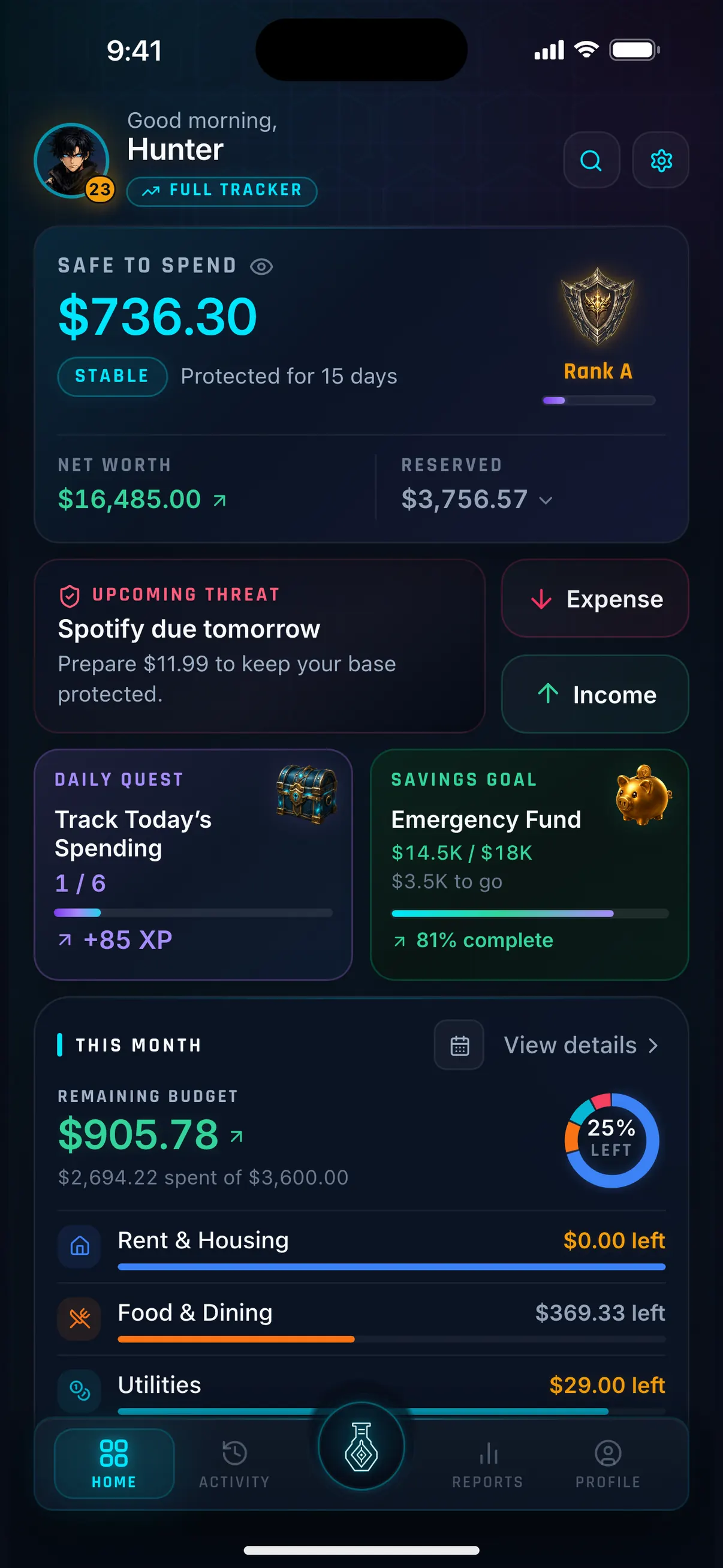
Hunter Vault's free tier includes the core financial tracking features alongside the RPG progression system: XP, levels, ranks, titles, quests, and achievements. You log expenses manually, set budget categories, track debt and savings goals, and earn XP for consistent financial habits. There is no automatic bank sync at any tier — this is a deliberate privacy-first design. The Awakened Hunter upgrade is a one-time purchase, not a subscription.
Why we like it
- XP, levels, quests, and achievements available in the free tier
- Budgets, debt tracking and savings goals in the free tier (up to 8 budgets, 3 debts, 2 savings goals)
- No bank account connection required — no credential sharing
- Budgeting never requires a subscription — Awakened Hunter is a one-time purchase (Hunter Pass and cloud sync are optional subscriptions)
- Core tracking works offline
Limitations
- No bank sync — you enter transactions or import a CSV you export from your bank; no automatic bank feed
- Mobile-first — iOS and Android; no web entry interface
- RPG framing is not for everyone; those wanting purely functional tools may prefer alternatives
- Smaller community than established apps like YNAB or Goodbudget
Key details
Rocket Money
Best for Finding forgotten subscriptions (free tier)
Rocket Money's free tier connects to your bank accounts and identifies recurring subscription charges — services you may have signed up for and forgotten. This alone can save more than any premium budgeting feature. The free plan includes spending overview and subscription detection. Premium adds bill negotiation, savings accounts, and advanced features at $7–$14/month (you select your own price).
Why we like it
- Subscription detection can find forgotten recurring charges quickly
- Free tier is functional for basic tracking
- Bank sync is reliable for US accounts
- Bill negotiation service available (premium feature)
- Clear dashboard showing recurring vs one-time spending
Limitations
- Bill negotiation, savings accounts, and credit tracking require Premium ($7–$14/month)
- Bill negotiation charges a percentage of savings as a fee
- Budgeting methodology is shallow — primarily tracking, not planning
- Manual entry experience is minimal
- US-focused — limited usefulness outside the US
Key details
Monefy
Best for Simple free manual expense tracking
Monefy is a minimalist manual expense tracker available for iOS and Android. The free version lets you log expenses across categories and view basic charts showing where your money went. It is not a budgeting app in the full sense — there are no goals, envelope limits, or structured methodology — but for pure spending awareness through manual entry, it is quick and clear.
Why we like it
- Very fast expense logging — optimized for quick manual entry
- Clean visual breakdown of spending by category
- No account or sign-up required
- Works offline
- Minimal interface — low barrier to use daily
Limitations
- No budgeting methodology — tracks spending but does not plan it
- No bank sync at any tier
- No debt tracking or savings goals
- Free version has ads and limited accounts; Pro upgrade (~$2.49 one-time) removes ads and expands features
- Limited reporting depth
Key details
Money Lover
Best for Multi-wallet tracking with a free tier
Money Lover's free tier lets you track spending across multiple wallets with budgets and reports, on mobile and web. It is polished and popular — but the free tier carries ads and requires an account, and the features many people want (extra wallets, bank connections) sit behind a Premium subscription that replaced the old lifetime option.
Why we like it
- Clean multi-wallet interface with budgets, reports, and recurring transactions
- Works across iOS, Android, and the web
- Receipt scanning and spending insights
- Bank connections available in some regions
- Large, established user base
Limitations
- Premium moved to a subscription — some lifetime buyers report being asked to pay again
- Ads on the free tier
- Requires an account; reviewers report sign-up and sync issues
- Can feel laggy or buggy after some updates
- No motivation or gamification layer
Key details
Money Manager (Realbyte)
Best for Detailed manual tracking, free with ads
Money Manager by Realbyte is free to use (ad-supported) and built on a detailed, double-entry, accounts-and-assets model with strong charts and PC/Excel export. It needs no bank connection. The catch is ads — which users report persisting even after paying to remove them — and a depth that is more than casual trackers need.
Why we like it
- Detailed double-entry accounting with accounts and assets
- Strong charts, reports, and PC/Excel export
- Manual-first — no bank connection required
- Budgets and recurring transactions
- Large, long-established user base
Limitations
- Free version is ad-supported — users report ads persisting after paying to remove them
- Remove-ads and paid features can re-charge on a new device
- Double-entry model is heavier than many people need
- No savings-goal or motivation layer
- Mobile-first — desktop only via export
Key details
Context and considerations
A note on "free" vs "free trial"
Several well-known budgeting apps offer free trials but not permanently free tiers. YNAB offers a 34-day trial before requiring a subscription. Monarch Money has a trial period before billing starts. These are not free apps in the same sense as Empower, Goodbudget, or Hunter Vault.
When evaluating "free" claims:
- Permanently free: The app works without payment indefinitely. Empower and Goodbudget (free tier) are examples.
- Freemium: A limited free tier exists permanently, but meaningful features require upgrading. Many apps fall here.
- Free trial: The app requires payment after a trial period. Not a free app.
- One-time purchase: Pay once, use indefinitely. Hunter Vault's Awakened Hunter tier is this model.
A freemium app can be genuinely useful — 20 Goodbudget envelopes covers most budgets. But read the free tier limits carefully before building your budget system around an app that may require an upgrade later.
Free Apps and Bank Sync
Most apps with free bank sync in the US use aggregators like Plaid or Finicity. These are read-only connections — the app can see your transactions but cannot move money. For free tiers, the sync is usually the same quality as paid tiers since it costs the app relatively little to maintain once integrated.
Outside the US, free bank sync is rarer. In Australia, CDR (Consumer Data Right) enables open banking connections, but most apps with good CDR integration are paid (e.g., Frollo, PocketSmith). In the UK, FCA-regulated open banking is similarly more common in paid tiers (Emma, Snoop).
If you prefer not to share bank credentials, manual apps — Goodbudget, Hunter Vault, Monefy — are free and require nothing beyond the app itself.
How to Choose a Free Budgeting App
The right free app depends on what you actually need:
If you want automatic tracking with no effort: Empower is the strongest fully free option in the US. It connects your accounts and shows spending and net worth without a subscription.
If you want envelope-style planning without bank access: Goodbudget's free plan (20 envelopes) is the most complete free envelope app available.
If you want to build consistent habits: Hunter Vault's free tier includes the core gamification system — XP, quests, achievements, and rank progression (themes are part of Awakened Hunter) — with no subscription required.
If you want to find forgotten subscriptions: Rocket Money's free tier does this well for US accounts — subscription detection is available without paying.
If you want the simplest possible tracker: Monefy is fast, minimal, and free for core expense logging.
The biggest risk with free apps is investing in a system that later requires a paid upgrade. Goodbudget's free envelope limit, Monefy's feature restrictions, and Hunter Vault's free caps (8 budgets, 3 recurring entries, 5 accounts, 3 debts, 2 savings goals) are the main factors to check before committing.
Frequently asked questions
Are any good budgeting apps completely free?
Yes. Empower (formerly Personal Capital) is fully free with bank sync and investment tracking. Goodbudget has a permanently free tier with 20 envelopes. Hunter Vault's core budgeting, XP, and quest features are free with an optional one-time Awakened Hunter upgrade. These are not trials — they are free indefinitely.
What is the difference between free, freemium, and free trial?
Free means the app works at no cost indefinitely. Freemium means a limited version is free permanently but meaningful features cost money. Free trial means the full app is temporarily free, then requires payment. Many budgeting apps marketed as 'free' are actually free trials — YNAB, Monarch Money, and Simplifi all require a subscription after their trial period ends.
Is YNAB free?
YNAB offers a 34-day free trial. After that, it costs $14.99/month or $109/year. There is no permanently free tier. YNAB is worth the cost for many users, but it is not a free app.
Can I budget without linking my bank account for free?
Yes. Goodbudget (20 envelopes, free), Hunter Vault (core budgeting free, with limits), and Monefy (basic tracking, free) all work with manual entry and require no bank connection. These apps are completely free for their core features with no credential sharing required.
What is the best free budgeting app for someone outside the US?
Bank sync for free apps is primarily a US feature. Outside the US, manual apps work globally: Goodbudget and Hunter Vault are free and available internationally. Monefy is also globally available. For country-specific options, see the dedicated guides for Canada, Philippines, Australia, and the UK.
More Hunter Vault guides
Level up your money
Track spending, complete quests, and build better financial habits — the RPG way. Free to start, no bank linking required.


Free to start · No account needed · Works offline