Best Budgeting Apps in India for 2026
Budgeting in India has its own shape. Most day-to-day spending runs through UPI — PhonePe, Google Pay, Paytm — alongside cards and a lot of cash. There is no open-banking framework that lets budgeting apps safely pull your transactions the way Plaid does in the US, so the popular Indian apps take a different route: they read your transaction SMS alerts to log spending automatically, without a bank login. That works well for UPI and card payments, but it means granting SMS access, and it still misses cash. This guide compares the realistic options for Indian users — the SMS-based trackers, the manual-first apps, and where each one fits.
On this page
Our picks for different budgeters
Side-by-side comparison
| App | Best for | Price | Bank sync | Manual entry | Debt tracking | Savings goals | Platforms |
|---|---|---|---|---|---|---|---|
| Hunter Vault Our app | Private, gamified manual budgeting | Free / one-time Elite (check India price) | No — manual, no SMS access | Yes | Yes | Yes | iOS, Android |
| Money View | Automatic UPI/card tracking via SMS | Free (money management) | SMS auto-read (no bank login) | Yes | Limited | Limited | Android (SMS), iOS limited |
| Axio (ex-Walnut) | Lean SMS-based expense tracking | Free (check listing) | SMS auto-read (no bank login) | Yes | Limited | No | Android (SMS), iOS limited |
| ET Money | Tracking + investing in one app | Free (expense tracking) | SMS auto-read (no bank login) | Yes | No | Via investments | iOS, Android |
| YNAB | Structured zero-based method | USD $14.99/mo or $109/yr | No Indian bank sync | Yes | Yes | Yes | iOS, Android, Web |
| Monefy | Fast simple expense logging | Free (ads) / ~Pro (check listing) | No | Yes | No | No | iOS, Android |
Manual entry, debt & savings
Manual entry, debt & savings
Manual entry, debt & savings
Manual entry, debt & savings
Manual entry, debt & savings
Manual entry, debt & savings
Table last reviewed August 2026. Verify current pricing and features with each app's website — details may change.
How we evaluated these apps
We weighted each criterion around what actually matters for budgeters in India — local currency and bank support, cash and e-wallet habits, and app availability.
How quickly you can set up a budget, log spending, and understand where your money goes.
Budgeting flexibility, expense-tracking quality, debt tracking, and savings-goal features.
Bank-sync availability and reliability, the manual-entry experience, and CSV / import support.
Pricing structure, free tiers, and whether paid plans are worth it for most people.
How each app handles your financial data, and whether bank linking is required at all.
iOS / Android / web availability, currency and localization support, and who the app is built for.
App-by-app breakdown

Hunter Vault Our app
Best for Private, gamified budgeting with no SMS or bank access
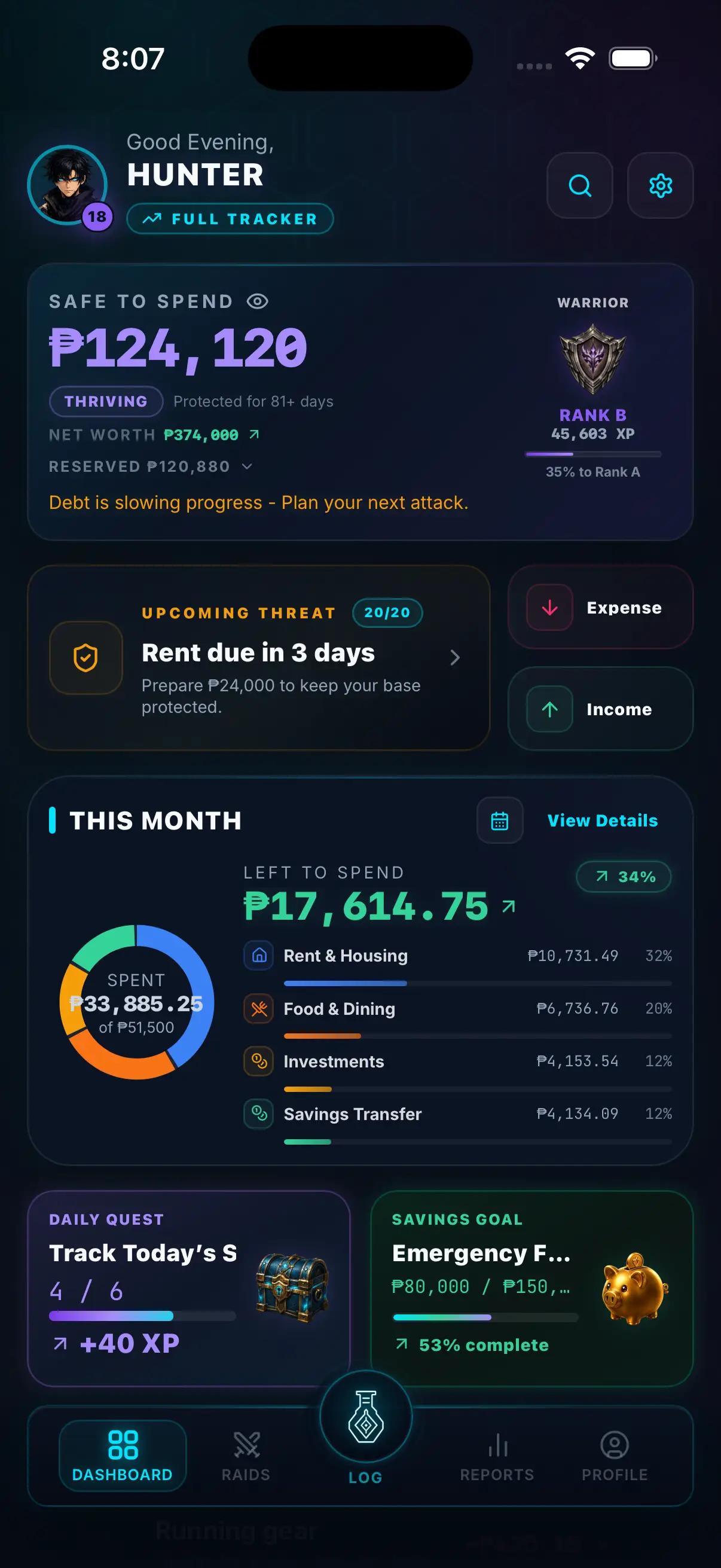
Hunter Vault is our own app, so weigh this accordingly. We include it because it answers a specific Indian frustration: the popular trackers want SMS access to auto-log your UPI and card payments, and some people would rather not grant a third-party app permission to read their messages. Hunter Vault reads nothing — you log spending yourself, it stays on your device, and there is no bank login or SMS permission involved. You can track UPI, card, and cash spending in one place by creating separate accounts.
Why we like it
- No SMS access and no bank login — nothing is read from your phone or accounts
- Works for UPI, cards, and cash because you log it manually
- Gamified: XP, quests, levels, ranks, and streaks keep the habit going
- Full feature set: budgets, expense tracking, savings goals, debt tracking, recurring bills
- Works offline; Android and iOS
- Elite is a one-time purchase — no USD subscription converting to a monthly INR cost
Limitations
- Manual entry — you log each expense yourself (no SMS auto-capture)
- No automatic UPI or bank import
- Single-user; no household sharing
Key details
Money View
Best for Automatic UPI and card tracking through SMS
Money View is one of the most established Indian money-management apps. With your permission, it reads your bank and UPI transaction SMS alerts and turns them into categorised spending automatically — no bank login required — then layers on budgets and bill reminders. It is the lowest-effort way to reconstruct where your UPI and card money goes, as long as you are comfortable granting SMS access. (Money View also offers lending products, which is a separate part of the app.)
Why we like it
- Automatic expense tracking from transaction SMS — little manual effort
- No bank login needed; works off the SMS your bank already sends
- Budgets, categories, and bill reminders built in
- Reconstructs recent history quickly once SMS access is granted
Limitations
- Requires granting SMS read access, which some users prefer to avoid
- SMS parsing misses cash entirely
- Auto-capture works best on Android; iOS is more limited
- The app also pushes lending products
Key details
Axio (formerly Walnut)
Best for A lean, focused SMS-based expense tracker
Axio grew out of Walnut, one of the apps that popularised SMS-based expense tracking in India. It keeps a lean, tracking-first experience: grant SMS access and it logs your UPI and card spending automatically, splits expenses, and shows where your money went. Like Money View, the trade-off is SMS permission, and cash still has to be added by hand.
Why we like it
- Clean, tracking-focused experience with SMS auto-capture
- No bank login required
- Expense splitting and spend summaries
- Established lineage from the well-known Walnut app
Limitations
- Needs SMS read access
- Does not capture cash automatically
- Also offers credit/BNPL products alongside tracking
- Fewer full-budgeting features than a dedicated budget app
Key details
ET Money
Best for Expense tracking alongside investing
ET Money is best known as an investing app (mutual funds, SIPs), but it also includes free SMS-based expense tracking. If you want your spending overview and your investments in the same place, it is a practical all-in-one — grant SMS access and your transactions are categorised automatically. As a pure budgeting tool it is lighter than a dedicated app, but the investing side is a genuine draw for many Indian users.
Why we like it
- Free SMS-based expense tracking
- Investing (mutual funds, SIPs) in the same app
- Automatic categorisation of UPI and card spend
- Useful if you want spending and investing together
Limitations
- Requires SMS access for auto-tracking
- Budgeting features are lighter than dedicated budget apps
- Primary focus is investment products
- Cash not captured automatically
Key details
Goodbudget
Best for Envelope budgeting without any auto-tracking
Goodbudget uses the envelope method — divide your income into labelled categories and spend from each until it is empty. It does not read your SMS or link a bank; everything is entered manually, which some Indian users prefer precisely because it avoids granting any access. It works in any currency, so INR is fine, and the free plan is genuinely usable.
Why we like it
- No SMS access or bank login — fully manual and private
- Envelope method is intuitive and effective
- Free plan available; household sharing
- Works in INR and on web
Limitations
- No automatic UPI/SMS capture — you log everything
- Premium is USD-priced
- Limited debt payoff tools
Key details
Monefy
Best for Quick, simple manual logging
Monefy is a minimal expense tracker with a tap-the-category-and-enter-an-amount interface. No SMS access, no bank login — purely manual and fast. It has no budgeting method, debt tracking, or savings goals, but for quickly logging a chai, an auto fare, or a UPI payment, it is one of the fastest tools going.
Why we like it
- Extremely fast manual logging
- No SMS or bank access; works offline
- Visual spending wheel
- Available on iOS and Android
Limitations
- No budgeting by income, savings goals, or debt tracking
- Free version has ads
- Minimal reporting
Key details
YNAB (You Need A Budget)
Best for The most structured budgeting method
YNAB teaches zero-based budgeting — give every rupee a job before you spend it. There is no Indian bank sync, so you log manually (or import a CSV), which in India is the norm anyway. The method is powerful and the community is large; the main barrier is the USD subscription, which is a real cost once converted to INR.
Why we like it
- Rigorous zero-based method that works in any currency
- Strong debt and savings tools
- Large community and tutorials
- 34-day free trial
Limitations
- No Indian bank or UPI sync
- USD subscription — meaningful monthly INR cost
- Steep learning curve
Key details
Budgeting in India
UPI and SMS-based tracking — the Indian shortcut
The defining feature of Indian budgeting apps is SMS-based auto-tracking. Because almost every UPI and card transaction triggers a bank SMS, apps like Money View, Axio, and ET Money ask for permission to read those messages and turn them into categorised expenses automatically — no bank login, no open-banking connection. It is genuinely low-effort for UPI-heavy spenders.
The trade-offs are worth knowing. First, you are granting an app read access to your SMS inbox, which some people are not comfortable with. Second, SMS parsing only sees what generates a message — cash spending is invisible, and the odd merchant SMS can be misread. Third, auto-capture works best on Android; on iOS it is far more limited.
If the SMS permission is a dealbreaker for you, the alternative is a manual-first app (Hunter Vault, Goodbudget, Monefy) where nothing is read from your phone at all.
Cash still has to be logged by hand
Even with UPI everywhere, cash is far from gone in India — autos, vendors, local markets, tips. No SMS-based app can capture a cash payment, because there is no message to read. So every Indian budgeter logs cash manually regardless of which app they use. That narrows the real gap between "automatic" SMS apps and fully manual apps: you are typing in cash either way.
Why there is no real bank sync for budget apps
India does not have a consumer open-banking setup that budgeting apps plug into the way US and UK apps do. The RBI's Account Aggregator (AA) framework exists and is growing, but it is mostly used by lenders and wealth platforms for consented data sharing, not by everyday expense trackers. That is exactly why SMS parsing became the popular workaround. For most users, the practical choice is between SMS-based auto-tracking and manual logging — not live bank sync.
USD pricing vs one-time local cost
Many global budgeting apps (YNAB, Goodbudget Premium) are priced in USD, so the INR cost rises and falls with the exchange rate and tends to feel steep. Indian apps are typically free (they monetise through lending or investing). Hunter Vault's Elite unlock is a one-time in-app purchase rather than a recurring USD subscription — check the India store listing for the current local price.
SMS auto-tracking vs manual budgeting in India
In India the real choice is not "sync vs manual" — it is **SMS auto-read vs manual**, because live bank sync for budget apps barely exists here.
**SMS-based auto-tracking (Money View, Axio, ET Money):** You grant SMS access and the app logs UPI and card transactions from your bank's messages automatically. Lowest effort for digital spending. Requires trusting the app with your SMS inbox, and misses cash.
**Manual entry (Hunter Vault, Goodbudget, Monefy):** You log each expense yourself. More effort, but nothing is read from your phone or accounts — the most private option — and the act of logging builds awareness.
**CSV / statement import:** A few apps (YNAB) accept CSV exports from your bank's net-banking portal. Periodic rather than automatic.
There is no wrong answer — it depends on how you weigh effort against privacy. If you want zero typing for UPI and are fine with SMS access, go SMS-based. If you would rather grant nothing, go manual. Hunter Vault is manual by design: no SMS permission, no bank login.
What to look for in a budgeting app in India
**SMS access — yes or no?** Decide up front whether you want automatic SMS-based tracking (and are comfortable granting inbox access) or would rather log manually and grant nothing.
**UPI reality:** Most of your digital spending is UPI. SMS apps capture it automatically; manual apps need you to log it (quickly) yourself.
**Cash logging:** You will log cash by hand in any app, so a fast manual-entry experience matters even if you pick an SMS-based tracker.
**INR support:** Any serious app supports INR as a custom currency — confirm before committing.
**Android vs iOS:** SMS auto-tracking is strong on Android and weak on iOS. If you are on iPhone, the gap between SMS apps and manual apps shrinks.
**Pricing:** Local apps are usually free; global apps are often USD subscriptions. Prefer a free tier or a one-time local purchase if recurring USD cost is a concern.
**Motivation:** If you have abandoned trackers before, a gamified app (Hunter Vault) gives you a reason to keep logging that a plain tracker does not.
Frequently asked questions
What is the best expense tracker app in India?
It depends on whether you want automatic SMS-based tracking or manual control. For hands-off UPI and card tracking, Money View and Axio (formerly Walnut) read your transaction SMS and log spending without a bank login. If you would rather not grant SMS access, a manual-first app like Hunter Vault, Goodbudget, or Monefy keeps everything on your device. There is no single winner — it is a privacy-vs-effort choice.
Which apps track UPI spending automatically?
Apps like Money View, Axio, and ET Money track UPI and card spending by reading your bank transaction SMS, so there is no bank login involved. This is the standard method in India because there is no open-banking sync for budget apps. The catch is that you grant SMS access and cash purchases are not captured automatically.
Do budgeting apps read my SMS — and is that safe?
Many Indian expense trackers work by reading your transaction SMS, which requires granting SMS read permission. Whether that is acceptable is a personal call — it means the app can read messages on your device. If you are not comfortable with it, choose a manual app that asks for no SMS access at all, such as Hunter Vault, Goodbudget, or Monefy. Always check an app's privacy policy before granting permissions.
Can I track expenses in India without linking a bank or granting SMS access?
Yes. Manual-first apps need neither. Hunter Vault, Goodbudget, and Monefy all let you log UPI, card, and cash spending by hand, with nothing read from your bank or your messages. You trade a few seconds of typing per purchase for maximum privacy and more spending awareness.
Are there free budgeting apps in India?
Yes. The popular Indian SMS-based trackers (Money View, Axio, ET Money) are free for expense tracking. Hunter Vault is free to start with all core features (expenses, budgets, savings goals, debt tracking, quests, XP). Monefy has a free version with ads. YNAB requires a USD subscription after its free trial.
Is Hunter Vault available in India?
Yes. Hunter Vault is on Google Play and the App Store and works in INR. It is manual and offline by design — no SMS access, no bank login — and the Elite unlock is a one-time in-app purchase. Check the India store listing for the current local price.
More Hunter Vault guides
Level up your money
Track spending, complete quests, and build better financial habits — the RPG way. Free to start, no bank linking required.


Free to start · No account needed · Works offline