Best AI Budgeting Apps in 2026 (What the AI Actually Does)
"AI-powered" on a budgeting app can mean a chatbot, automatic categorization, spending insights, or a marketing sticker on last year's rules engine. This guide ignores the label and compares the behavior: what the AI does for you, what data it needs to do it, what it costs, and where a human method still beats it. Prices verified November 2026.
On this page
Our picks for different budgeters
Side-by-side comparison
| App | Best for | Price | Bank sync | Manual entry | Debt tracking | Savings goals | Platforms |
|---|---|---|---|---|---|---|---|
 Cleo | Chat-first AI assistant + advances | Free / Plus $5.99/mo, Pro $8.99, Builder $14.99 | Yes | Yes | Yes | Yes | iOS, Android |
 Copilot Money | AI categorization on Apple | $95/yr | Yes | Yes | Yes | Yes | iOS, Mac (no Android) |
 Monarch Money | AI insights + full household budget | $14.99/mo or $99.99/yr (Core) | Yes | Yes | Yes | Yes | iOS, Android, Web |
 Hunter Vault Our app | AI companion + gamified manual budget | Free core (Hunter Pass for Huntee AI) | No | Yes | Yes | Yes | iOS, Android |
 Empower | Free AI-assisted dashboards | Free | Yes | Limited | Yes | Limited | iOS, Android, Web |
Cleo Manual entry, debt & savings
Copilot Money Manual entry, debt & savings
Monarch Money Manual entry, debt & savings
Hunter Vault Our app Manual entry, debt & savings
Empower Manual entry, debt & savings
Table last reviewed November 2026. Verify current pricing and features with each app's website — details may change.
How we evaluated these apps
We score every app against the same criteria, so the recommendations stay consistent and comparable.
How quickly you can set up a budget, log spending, and understand where your money goes.
Budgeting flexibility, expense-tracking quality, debt tracking, and savings-goal features.
Bank-sync availability and reliability, the manual-entry experience, and CSV / import support.
Pricing structure, free tiers, and whether paid plans are worth it for most people.
How each app handles your financial data, and whether bank linking is required at all.
iOS / Android / web availability, currency and localization support, and who the app is built for.
App-by-app breakdown
Cleo
Best for People who want to talk to their budget
Cleo is the purest "AI assistant" pick: a chat interface that roasts and praises spending, answers money questions, tracks subscriptions, and — on paid tiers — offers cash advances (up to $250 on Plus at $5.99/month or $44.99/year; Pro $8.99 and Builder $14.99 add savings APY, coaching, and higher limits). The AI is genuinely conversational, but there is no budget framework underneath — it comments more than it plans. US and UK.
Why we like it
- Most conversational AI of any pick — real dialogue
- Spending commentary plus subscription tracking
- Cash advances for eligible users (Plus and up)
- Credit score tracking and Debt Reset plan
- Free tier covers basic chat and tracking
Limitations
- No budget framework — personality over planning
- Cash-advance model creates wrong incentives
- Plus at $71.88/yr (monthly) is steep for chat
- Bank sync required for the full experience
- Novelty wears off for structured budgeters
Key details

Copilot Money
Best for People who want AI working invisibly on categorization
Copilot's AI does the unglamorous job brilliantly: bank transactions arrive pre-categorized with unusual accuracy, investments are tracked, and the review flow makes corrections fast. At $95/year on iPhone and Mac only (no Android), it is the pick for users who want AI as infrastructure, not entertainment. No chat, no advances — just the best automatic tracking in the category.
Why we like it
- Best automatic categorization available
- Investment tracking included
- Fast, beautiful Apple-native apps
- AI stays invisible — no gimmicks
- No advances, no credit upsells
Limitations
- No Android app (web app only outside Apple)
- $95/year with no free tier
- US-focused bank sync
- No conversational AI at all
- Smaller company, narrower platform bet
Key details

Monarch Money
Best for People who want AI insights inside a complete budget
Monarch applies AI across a full system: smart categorization, recurring-transaction detection, spending insights, and forecasting (Plus tier) inside budgets, goals, net worth, and household sharing. At $99.99/year Core with a 7-day trial, it is the fullest answer to "AI budgeting" — less chatty than Cleo, less invisible than Copilot, more complete than either. US-focused sync.
Why we like it
- AI across categorization, insights, and forecasting
- Complete budget: goals, net worth, household
- Reliable US bank sync
- Recurring detection rivals dedicated trackers
- Web + mobile apps
Limitations
- $99.99/year Core — no free tier
- No conversational assistant
- Primarily US-focused for bank sync
- AI assists tracking more than decisions
- Plus ($199.99/yr) gates forecasting
Key details

Hunter Vault Our app
Best for People who want an AI companion with no bank link
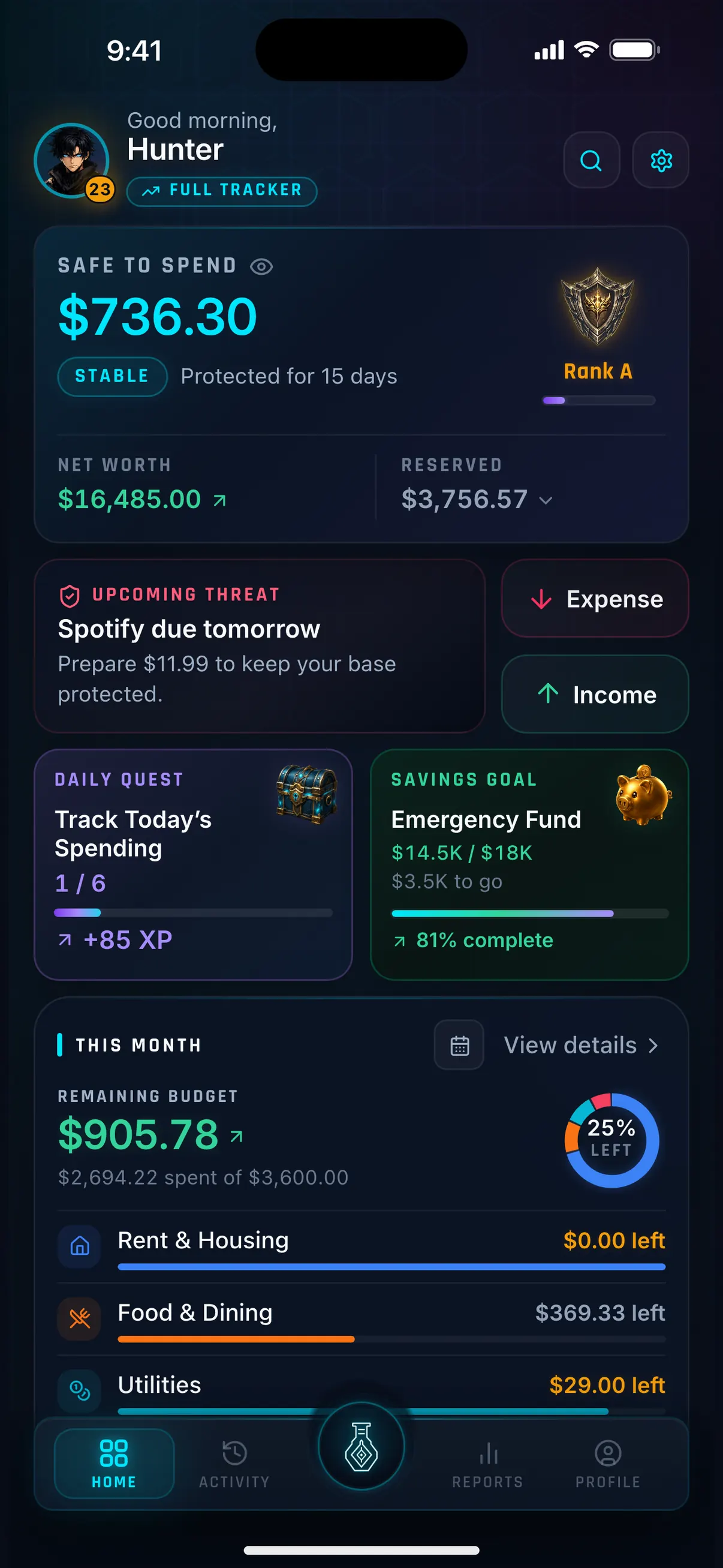
Hunter Vault's AI is Huntee: ask questions about your spending ("how much did I spend on games this month?") and get answers from your own logged history — with no bank connection involved, ever. Around it sits a complete manual budget with a gamified layer (quests, XP, ranks) that keeps logging accurate. Free core covers real budgeting; Huntee AI and Smart Import come with Hunter Pass. The privacy-first AI pick: the assistant sees only what you typed.
Why we like it
- Conversational AI with zero bank-data exposure
- Answers grounded in your own logged history
- Gamified habit layer keeps data accurate
- Full manual budget around the assistant
- Core budgeting free, never subscription-gated
Limitations
- No bank sync — AI only knows what you log
- Huntee requires Hunter Pass (paid)
- Mobile-first — no web entry interface
- Narrower AI scope than bank-fed rivals
- Smaller community and training-data scale
Key details
Empower
Best for People who want AI-assisted dashboards free
Empower applies automation and insights to bank-synced dashboards — spending breakdowns, cash-flow views, net worth, and investment analysis — entirely free. The "AI" is dashboard intelligence, not conversation: no chat, no coach, no questions answered. For users who want machine-assisted visibility at zero cost, it is unmatched; for users who want guidance, it is the thinnest pick here. US-focused.
Why we like it
- Completely free with bank sync
- Automated insights across spending and investments
- Net worth and retirement views included
- Every platform including web
- Zero setup beyond linking accounts
Limitations
- No conversational AI, no coaching
- Passive dashboards — no planning framework
- Limited manual entry
- Wealth-management outreach
- US-focused
Key details
Context and considerations
What "AI" actually means in each app
Four different behaviors share one buzzword:
Chat (Cleo, Huntee): you ask, it answers. Best for engagement and quick questions. Quality depends on what data it can see — bank-fed chat knows more, manual-fed chat knows only what you logged.
Categorization (Copilot, Monarch): transactions arrive pre-sorted. Best for accuracy with zero effort. Invisible when it works; you only notice the misses.
Insights (Monarch, Empower, PocketGuard): patterns surfaced from history — "dining up 30%", "new recurring charge". Best for awareness. No app here reliably converts an insight into a changed decision.
Coaching (Cleo Pro, YNAB-style rules): advice attached to the insight. Thinnest category — mostly upsell-adjacent tips. Treat every "AI coach" claim as marketing until it demonstrates otherwise.
Match the behavior to your failure mode: if you never open the app, chat wins. If you hate sorting transactions, categorization wins. If you overspend while fully informed, no AI category fixes it — a method (YNAB) or habit loop (Hunter Vault) does.
Does AI budgeting require bank sync?
Bank-fed AI knows more: Cleo, Copilot, Monarch, and Empower all draw insight from synced transactions — the broader the feed, the smarter the assistant. That is the genuine cost of privacy: manual-fed AI answers from a smaller world.
Hunter Vault's Huntee is the manual-fed proof of concept — it answers from what you logged, which is less than a bank feed but exactly what you chose to share. Decide by data appetite: if you want AI to surprise you with findings, feed it everything. If you want AI to answer from a world you control, feed it yourself.
How to choose the right AI budgeting app
Ask what job the AI should do:
"Talk me through my money": Cleo (bank-fed, advances attached) or Hunter Vault's Huntee (manual-fed, private, no advances).
"Sort everything perfectly, silently": Copilot Money on Apple, Monarch everywhere else.
"Show me patterns in a full budget": Monarch Money ($99.99/yr) or Empower (free, thinner).
"Keep my bank out of it": Hunter Vault — the only conversational AI here with no bank connection by design.
Privacy note: bank-fed AI means your transactions flow through an aggregator (usually Plaid) to the app's AI systems. Read each privacy policy before connecting. Manual-fed AI sees only what you type — a smaller brain, but yours alone.
Frequently asked questions
What is the best AI budgeting app?
Cleo for conversational AI ($5.99/mo Plus), Copilot Money for the best automatic categorization ($95/yr, Apple-only), Monarch Money for AI inside a full budget ($99.99/yr), or Hunter Vault for an AI companion with no bank link.
Can AI really help with budgeting?
AI helps with seeing (categorization, insights, answers) more than with doing (decisions, discipline). It removes friction reliably; it does not reliably change behavior. Pair any AI app with a method or habit loop for results.
Is it safe to give a budgeting app my bank login for AI features?
Bank connections run through regulated aggregators like Plaid, but exposure incidents have happened — read each app's privacy policy first. If the risk bothers you, manual AI (Hunter Vault's Huntee) answers from data you typed, with no bank involved.
Which AI budgeting app is free?
Empower is free with bank-synced dashboards and insights. Cleo has a free tier with basic chat. Hunter Vault's core budgeting is free; Huntee AI requires Hunter Pass.
Is Hunter Vault's Huntee a good AI budgeting assistant?
If you want conversational money help with zero bank exposure, yes: Huntee answers from your logged history inside a complete manual budget. If you want AI that sees everything automatically, bank-fed rivals (Cleo, Copilot, Monarch) know more — because you told them more.
More Hunter Vault guides
Level up your money
Track spending, complete quests, and build better financial habits — the RPG way. Free to start, no bank linking required.


Free to start · No account needed · Works offline