// budget planner

A budget planner that feels like

progress, not a diet

Set what you can spend, see where you should be by today, and treat staying on track like a quest — not a punishment.

  • Free to start
  • No account needed
  • Works offline
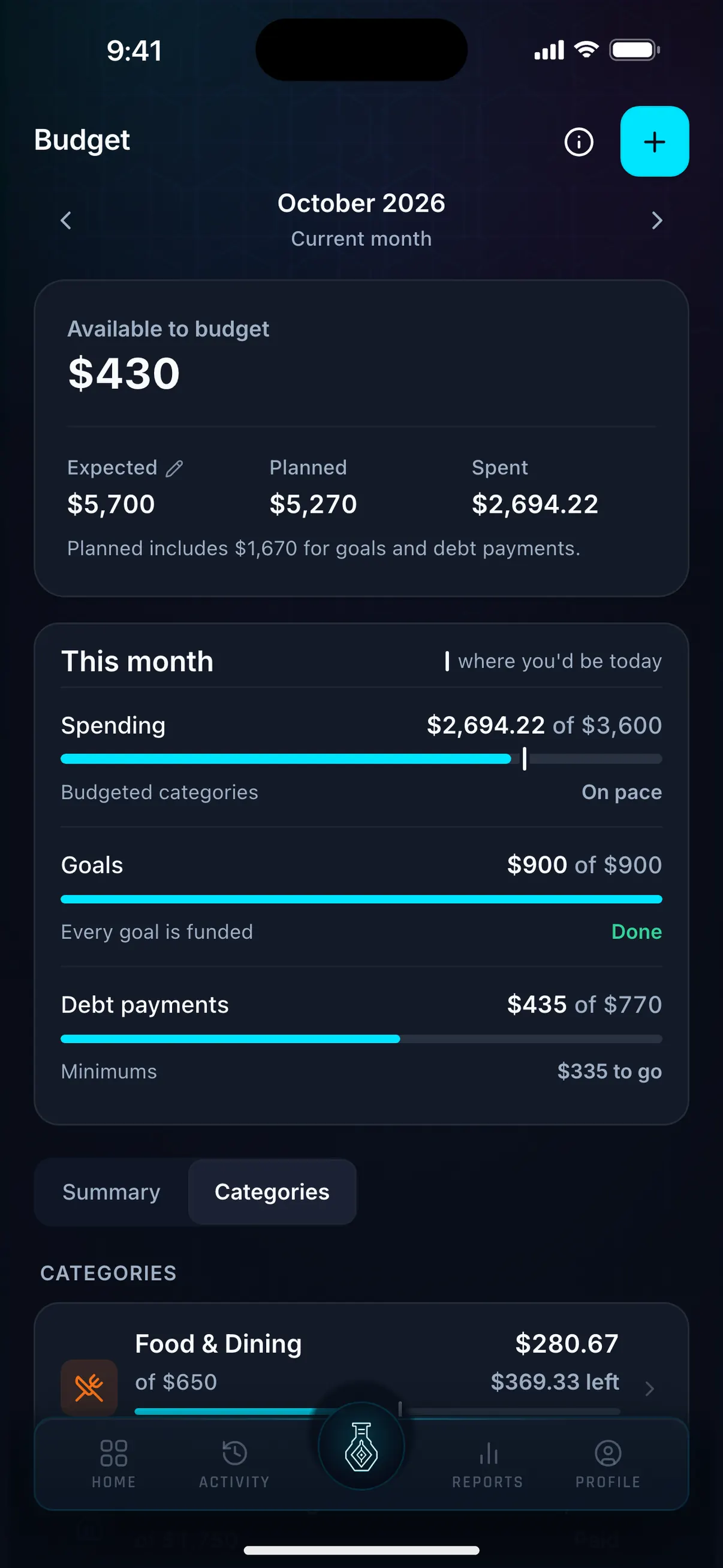
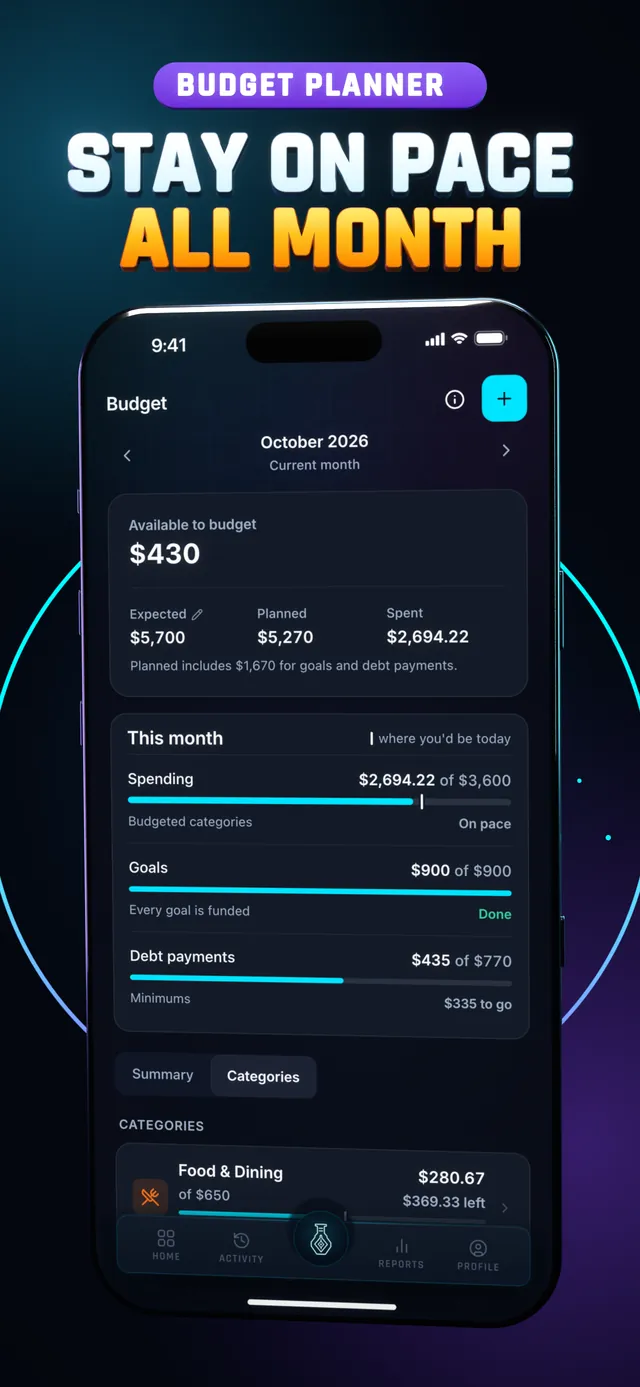
Hunter Vault Budget screen with $430 to assign and each category bar marking where you'd be by today
// core features

Everything you need to stay on track

Set limits, track against them, and know exactly where you stand — without a spreadsheet.

Monthly limits

Set a spending cap per category and watch it fill — not overflow. Know your ceiling before you hit it.

  • Limit any category you care about
  • Visual progress toward each cap
  • Resets monthly automatically
Monthly caps

50/30/20 ready

Use the proven 50/30/20 split with a tap, or ignore it and build your own. Either way, the structure is there if you want it.

  • 50/30/20 framework built in
  • Apply it or use a custom split
  • No complicated setup required
50/30/20

On pace, by today

Each budget bar has a marker for where you should be by today. Behind it, you're fine. Past it, you're spending faster than the month allows, and you can see it while there's still time to adjust.

  • A pace marker on every budget bar
  • Under, close or over, at a glance
  • All categories visible on one screen
Pace marker

Flexible categories

Make buckets that match your real life — including fun money. No template forces you into categories that don't fit. Categories you only track, with no limit, fold away so they don't crowd the ones you're managing.

  • Name categories anything you want
  • Include a guilt-free "fun" bucket
  • Tracked-only categories fold away
Your way

Available to budget

Available to budget sets aside your goal amounts and debt minimums first, the same way Safe to Spend does, so you only assign money that's actually free. As you log against your budget, totals update right away.

  • Goal amounts and debt minimums set aside
  • Agrees with your Safe to Spend number
  • Remaining amounts update on every log
Plans that add up

// watch it in action

Set up a monthly budget in under 3 minutes

Available to budget, the four budget types, a monthly limit on a category, and a Save for later travel fund.

How to Set Up a Monthly Budget in Hunter Vault Chapters and transcript →

More how-to videos: Budget Types Explained: Monthly vs Flexible vs Save for LaterThe Plan Page: See Your Whole Month on One ScreenHow to Organize Categories and Subcategories

// the real problem

Budgets don't fail because you overspend. They fail because there's no feedback until it's too late.

Most budgets feel like a cage — a list of rules you broke. That's not a system, it's just guilt after the fact. A good budget tells you where you stand before payday disappears, and makes staying on track feel like progress, not punishment.

  • No feedback until it's already gone
  • A pace marker that shows trouble early
  • Under-budget = a win, not just neutral
  • Progress, not punishment
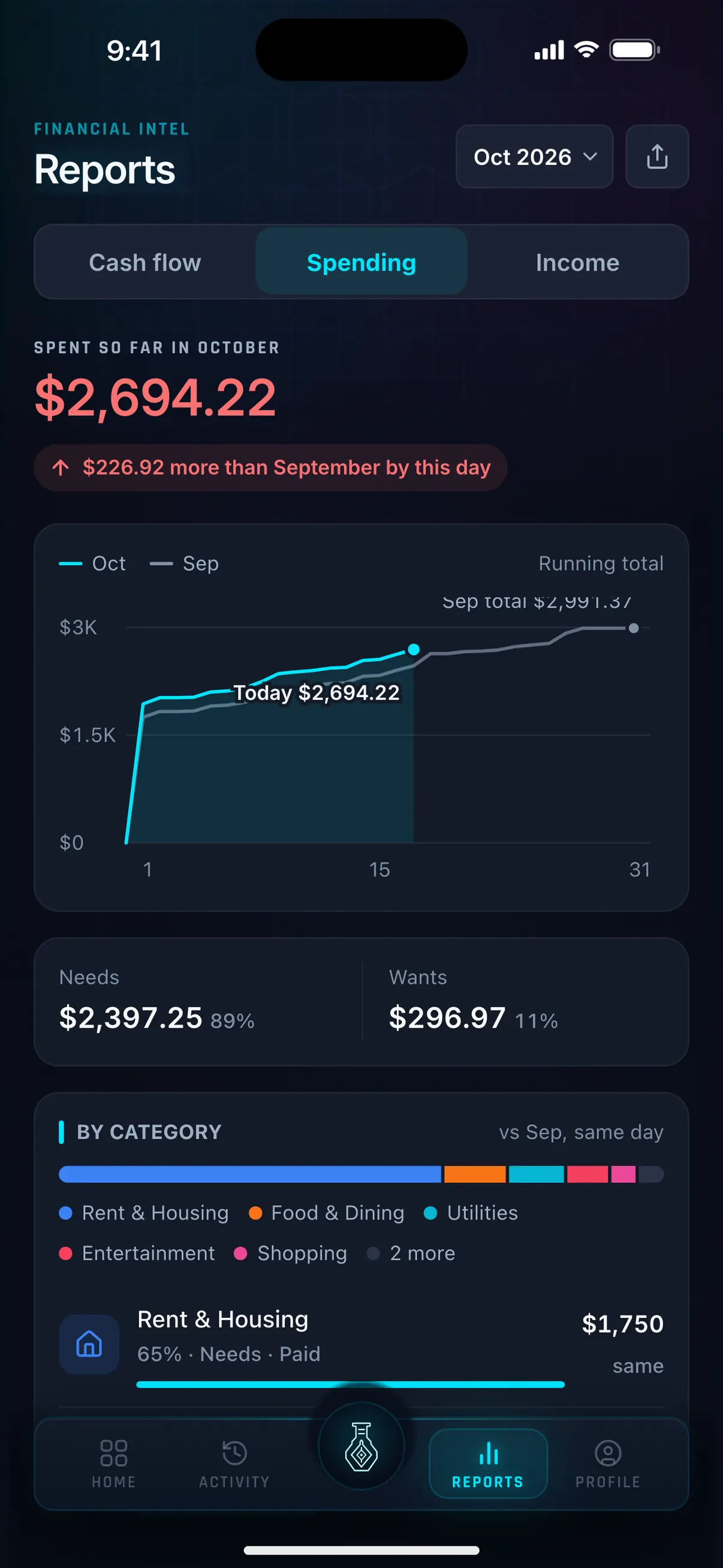
Hunter Vault Reports Spending tab: $2,694.22 spent so far in October, $226.92 more than September by this day, split into Needs and Wants
// what it is

A budget planner built for real life

Hunter Vault's budget planner lets you set monthly limits per category, follow a simple framework like 50/30/20 if you want one, and see where each category should be by today. Available to budget sets aside your goals and debt minimums first, so you always know what's left before you spend.

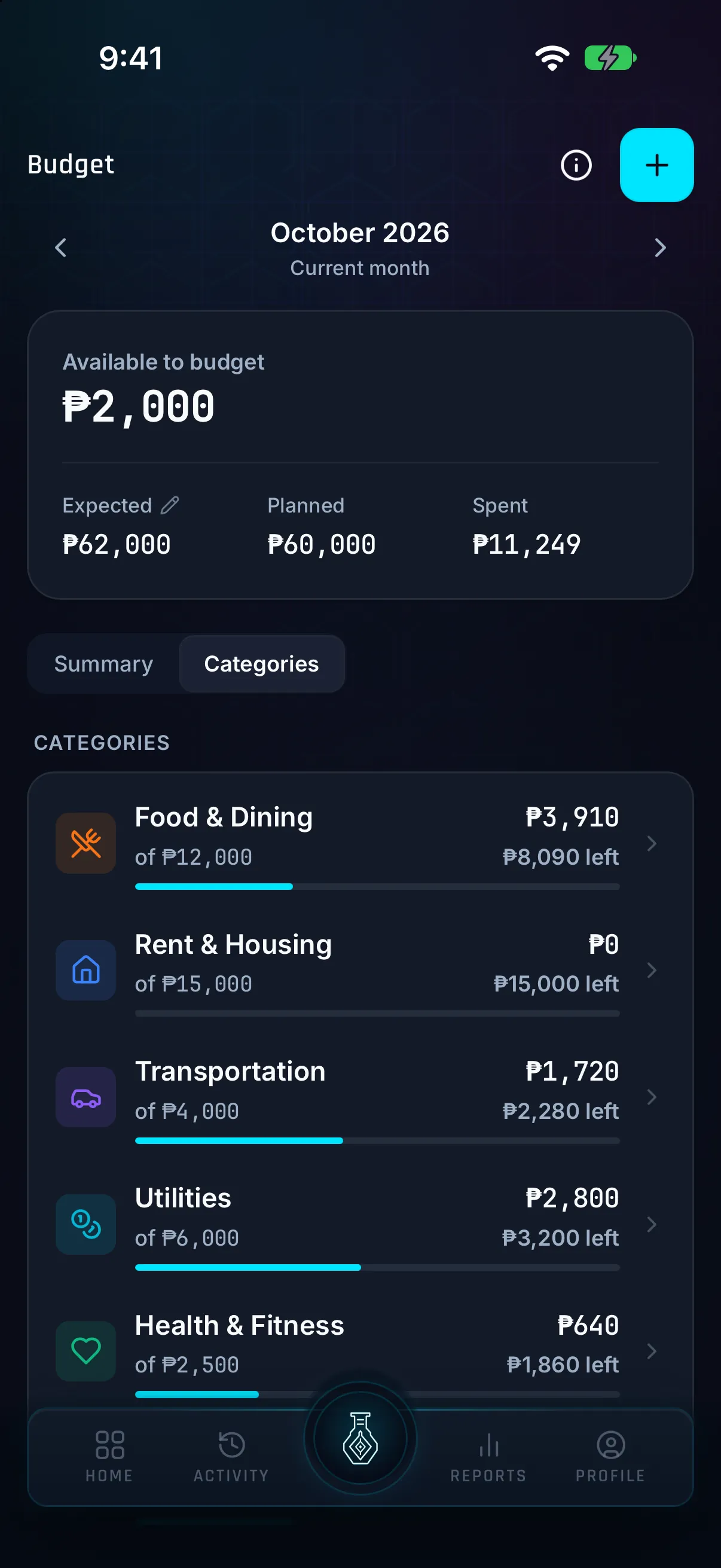
Hunter Vault budget screen showing money available to budget, expected income, planned and spent totals, and each category's amount left
// the gamified twist

Staying under budget is a win you can see.

Keeping budgeted categories at or under pace counts toward quests like Category Champion, and quests pay XP. Showing up builds your streak, and steady XP raises your rank. If a budget period ends over, nothing is taken from you: the Back on Pace quest asks you to bring those categories back to pace the next week. See the full gamification system →

  • Categories on pace count toward quests
  • Showing up builds your streak
  • Consistency raises your rank
  • Over budget? Back on Pace gives you a way back
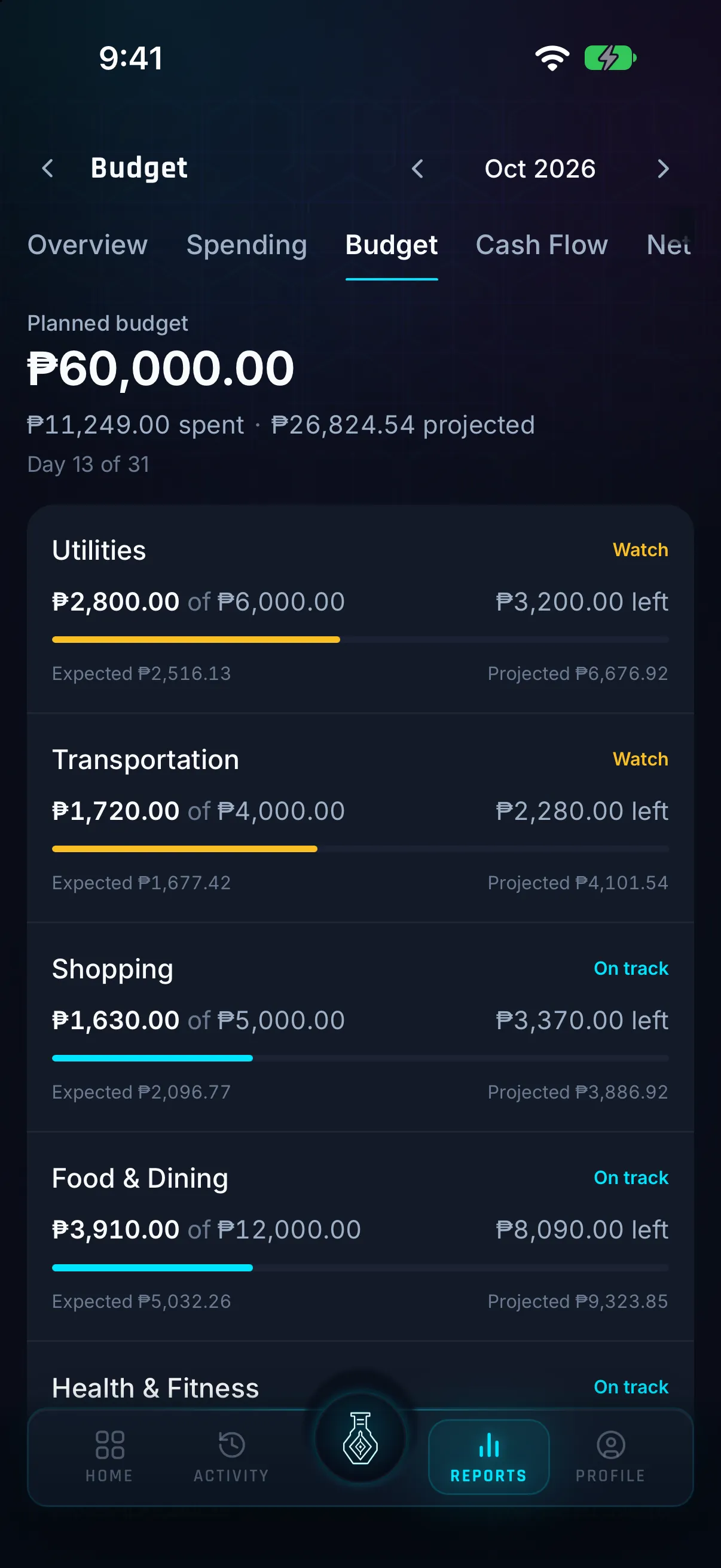
Hunter Vault budget report comparing each category's spending with its plan, with on-track and watch labels and a month-end projection
// why it works

Visibility beats willpower, every time

A budget you can see is one you'll actually keep. Willpower is a limited resource — it depletes under stress, when you're tired, when payday is still ten days away. But a clear, visual budget removes the need for willpower entirely. You don't have to remember your food limit if you can glance at it. Small visible wins — staying green in even one category — compound into a habit. Pair that with consistent expense logging and you stop guessing what's left and start knowing.

  • Visibility removes the need for willpower
  • Small wins compound into habits
  • Glanceable status = no mental math
  • Know, don't guess
Hunter Vault Budget screen with a pace marker on each category, under the headline Stay on pace all month

No account, no bank login. You set the limits, you log the spending, and it stays on your phone unless you turn on an online feature. Learn more about privacy →

// private by default

Your budget stays on your device.

No bank sync, full stop

Lives offline on your phone

No login, no email

Your limits, your data, your device

// questions

Frequently asked questions

The 50/30/20 rule splits your income into three buckets: 50% for needs (rent, bills, groceries), 30% for wants (dining out, entertainment), and 20% for savings or debt. Hunter Vault has this framework built in — you can apply it with a tap or ignore it and build your own split.

No. Hunter Vault's budget planner is flexible, not strict zero-based budgeting. Set limits for the categories that matter most to you and leave the rest open. A partial budget is still useful — it's better than no visibility at all.

No — it's manual and private by design. You set the limits and log spending yourself. Your data stays on your device unless you turn on an online feature, and no bank login is required.

Yes. Monthly limits, the pace marker, category tracking and the gamification system are free, and the free plan covers up to 8 budget categories. Awakened Hunter, a one-time purchase, makes budget categories unlimited and adds subcategories.

The category shows as over-budget so you can see it clearly — no shame, just signal. Nothing is taken from you. If a budget period ends over, the Back on Pace quest gives you a small target for the next week: bring those categories back to pace.

It shows where you should be by today. If the bar is behind the marker, you're spending slower than your limit allows; if it's past the marker, you're ahead of pace and may run out before the month ends. Categories you only track, with no limit, fold away so the bars that matter stay in view.

Available to budget now sets aside your goal amounts and debt minimums before it shows what's left to assign, the same way Safe to Spend does. That can make it drop once. The money hasn't gone anywhere; it's been given the job you already planned for it.

// your first move

Start with one limit. See how it feels to stay on track.

Pick one category — food, fun money, whatever matters most — and set a limit. Download Hunter Vault free on iOS and Android. No account, no bank sync, no spreadsheet required.

  • Free to start
  • No account needed
  • Works offline
See all features →
Hunter Vault rank shields from E to S, under the headline From E-Rank to S-Rank, with Offline by default, No bank login, No ads