- Your Steam, PlayStation, and Xbox accounts have full purchase histories — no bank access needed
- A dedicated gaming wallet (prepaid card, PayPal, gift card balance) acts as an automatic hard cap
- Manual logging in an app or spreadsheet gives you the most granular data
- A one-time 30-day audit reveals your baseline without requiring ongoing infrastructure
- Hunter Vault tracks gaming spend manually — no bank linking required
The standard advice from budgeting apps is: link your bank account, and we’ll categorize everything automatically. For some people, that’s fine. For others, it’s a non-starter.
Maybe you’re not comfortable with a third-party app holding your banking credentials. Maybe you share finances with a partner and gaming is one category you prefer to manage separately. Maybe you’ve tried the “connect everything” approach and found seeing all your spending at once more anxiety-inducing than useful. Maybe you just don’t see why a gaming budget tool needs access to your mortgage payment.
All of these are reasonable positions. None of them mean you have to fly blind on your gaming spend.
Here are four methods that give you accurate data on what you’re spending on games — none of which require linking a bank account.
Why Gamers Skip the Bank Link
Before the methods: it’s worth being direct about why this comes up specifically for gamers.
Gaming spend is unusually scattered. A single gamer might have active purchases across Steam, the PlayStation Store, Xbox Game Pass, Google Play, the App Store, and two or three individual game storefronts. None of these show up cleanly in a single bank transaction — a PlayStation Store charge appears as a generic “SONY” debit, an in-app purchase from a mobile game shows up as “Apple” or “Google.” Automatic categorization handles this poorly.
There’s also a pattern where gaming purchases are embarrassing-in-retrospect in a way that other spending isn’t. Seeing “$340 on games last month” in a shared household budgeting tool can create friction that has nothing to do with whether the spending was actually a problem. Tracking gaming spend separately sidesteps that entirely.
Finally: bank linking involves credential sharing or open banking APIs. Some people simply don’t want that exposure for a hobby tracker. That preference is legitimate and doesn’t require justification.
Method 1: Platform Purchase History Audit
Every major gaming platform maintains a complete purchase history. This is your first tool — it costs nothing, requires no setup, and gives you the actual numbers.
Steam: Account Details → View purchase history. This shows every game purchase, DLC, and in-game purchase made through Steam with dates and amounts. You can filter by year and manually total your annual spend.
PlayStation: Go to PlayStation Store → your account icon → Transaction History. Sony keeps a rolling 18-month history with full line items, including PlayStation Plus charges and any in-game currency purchases.
Xbox / Microsoft: Account.microsoft.com → Order history. Covers Game Pass, game purchases, and Xbox store transactions.
Google Play: Play.google.com → Order history. Shows all mobile game purchases and in-app transactions.
Apple App Store: Settings → your Apple ID → Media & Purchases → Purchase History. Shows all App Store and in-app purchases.
Running this audit across the platforms you use takes 20–30 minutes and produces your actual gaming spend for the past 12 months without touching a bank statement. Most people who do this for the first time find the number higher than their estimate — in-app purchases are the usual culprit.
Before setting up any tracking system, do the platform audit once. It tells you what you’re actually dealing with — and often reveals a specific platform or game category where most of the spend is concentrated.
If your spending is concentrated in one platform or one game, a targeted tracker for that platform is often more useful than a general budget. For gacha-heavy spending specifically, how to stop overspending on gacha games covers the spending patterns and mechanics worth knowing.
Method 2: The Dedicated Gaming Wallet
The cleanest budgeting system for gaming doesn’t involve tracking at all — it involves constraining the money available before you spend it.
Here’s how it works:
- Choose a dedicated payment method: a prepaid Visa/Mastercard, a separate PayPal balance, or by habitually buying platform gift cards (Steam, PlayStation, Xbox) instead of paying directly.
- At the start of each month, load a fixed amount. $50, $80, $120 — whatever your target gaming budget is.
- When the balance runs out, gaming purchases stop until next month.
No app. No transaction review. No categorization. The constraint is built into the method.
The critical rule: don’t top up mid-month. The whole system collapses if you add $20 to the wallet when you run low on the 18th. The top-up should happen on a fixed date — first of the month, payday, whatever is consistent — not reactively.
Prepaid cards work well for PC gaming (Steam, Epic, indie storefronts). For console-first gamers, buying platform-specific gift cards in a fixed amount per month achieves the same effect: you load $60 of PSN credit on the 1st, and that’s your PlayStation budget for the month.
This method is less granular — you know you stayed within budget, but you don’t know which game or purchase used the most — but for many gamers, the constraint is all they need.
Method 3: Manual Logging in an App or Spreadsheet
If you want the granular data — not just whether you stayed within budget, but which games, which platforms, which months — manual logging is the approach.
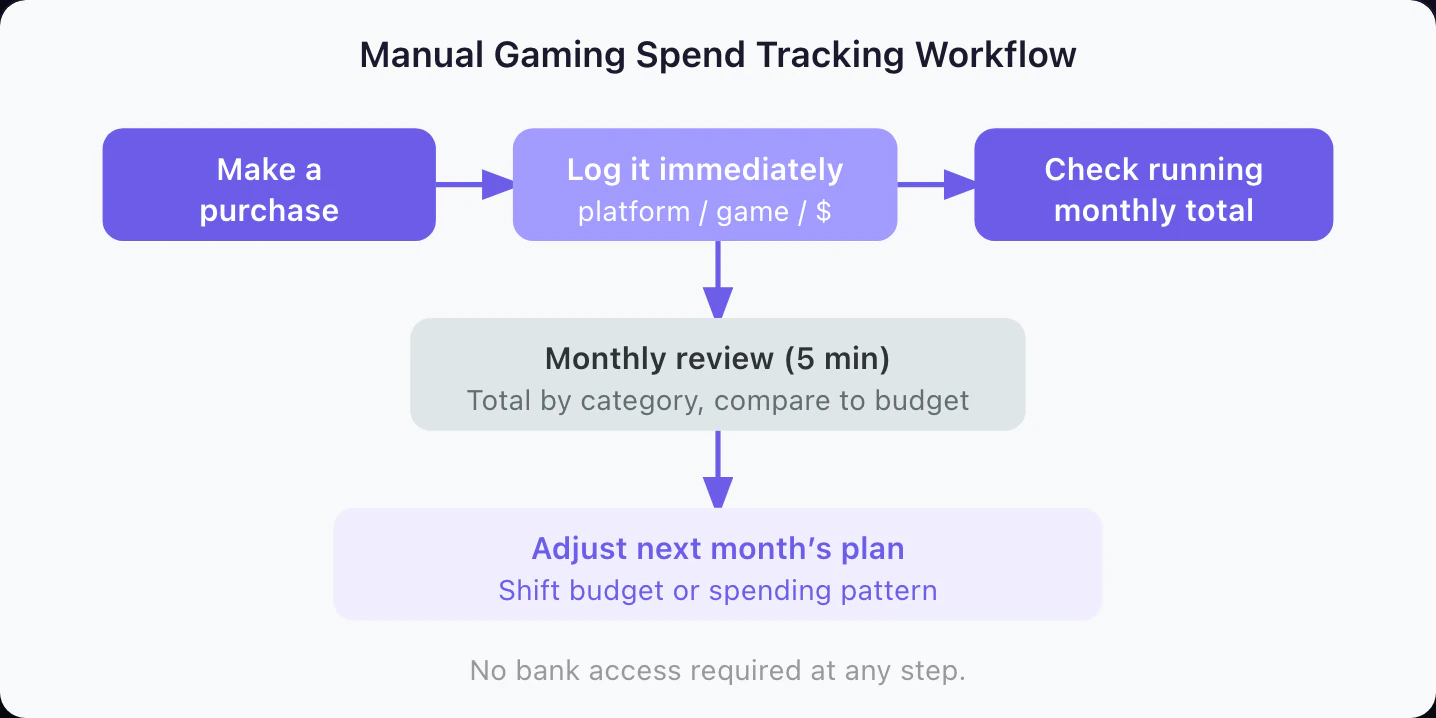
The barrier here is not the tracking itself. It’s building the habit of logging at the moment of purchase, not retroactively. A purchase logged immediately takes five seconds. A purchase you try to reconstruct two weeks later involves going through platform history, which defeats the efficiency point.
The practical setup:
- Pick a logging tool before you need it. Hunter Vault supports manual entry for gaming spend categories without requiring bank access. A Google Sheet or Notion database also works if you want zero apps.
- Define your categories upfront: Game Purchases, DLC, In-App / Microtransactions, Subscriptions, Hardware, Accessories. Six categories covers most of it.
- Log at point of purchase. Not at end of day. Not on the weekend. At the moment you click buy.
A minimal spreadsheet row: Date | Platform | Game/Item | Category | Amount. That’s it. Reviewing a month of this takes five minutes and tells you exactly where the spend went.
Log subscription renewals as calendar reminders so they don’t disappear into the noise. A $180/year PlayStation Plus charge is easy to forget about by month 2. Seeing it logged as a lump sum makes the monthly equivalent ($15) feel concrete.
For a detailed comparison of tools that support manual tracking without bank access, the privacy expense tracker roundup covers current options across platforms. And if you want a broader framework for budgeting without bank linking, budgeting without linking your bank account works through the full approach.
The Manual Tracking Workflow
The 30-Day Sprint: Your First Spending Audit
If you’ve never tracked gaming spend before and want a baseline before committing to any ongoing system, the 30-day sprint is the practical starting point.
Week 1 — Baseline audit: Run the platform purchase history review across every platform you use. Steam, PlayStation, Xbox, Apple, Google Play. Pull the last 12 months. Total it up by category.
Weeks 2–4 — Live tracking: Log every gaming purchase as it happens for the next three weeks. You don’t need to do anything with the data yet — you’re just collecting it.
End of 30 days: Review what you logged. Compare the three-week pace to your annual baseline. You now know: what your current spend rate is, which categories are driving most of it, and whether the annual total is in range with what you’d want it to be.
This 30-day sprint requires no subscription, no app account, no bank connection. A notes app and a calculator are sufficient.
Most gamers who do this discover that subscriptions and in-app purchases together account for more than 60% of their annual gaming spend — not the big game purchases they thought were the issue.
Setting Up a Recurring Review
Once you have the baseline, the ongoing system doesn’t need to be elaborate:
- Monthly: 5-minute check on spending logged that month. Did you stay within your target? Which category was highest?
- Quarterly: Pull platform purchase histories to catch anything you missed in manual logging. Useful if subscriptions or in-app purchases happen automatically and you don’t always log them.
- Annually: Full year-over-year comparison. Total gaming spend vs. the prior year, and whether any categories shifted significantly.
The monthly review is the one that matters most — it keeps the feedback loop short enough to change behavior in the current month, not four months later.
If you’re looking at gaming alongside broader spending patterns, the gamer’s guide to tracking and controlling spending covers how to set up a complete system that works whether you’re privacy-conscious or not.
Tools That Work Without Bank Linking
A quick reference on what works:
Hunter Vault — Built for gamers, supports manual logging by category, no bank connection required. Tracks spending by game or platform. The gamified interface makes logging feel less like admin work.
Google Sheets / Notion — Full control, free, requires setup. Works well if you’re disciplined about logging and want to customize categories. No privacy concerns — your data stays in your own account.
Toshl Finance — Supports manual entry alongside bank linking. The manual mode works without connecting any accounts.
Envelope method apps (GoodBudget, Monarch Money manual mode) — Envelope-style budgeting maps well to the gaming wallet approach. You set a gaming envelope, log spend against it, and see the remaining balance.
What doesn’t work without bank access: Mint, most automatic categorization apps, and any tool that bills itself as “set it and forget it.” Those require the transaction feed to function.
The Bottom Line
Tracking gaming spend without linking a bank account is not a compromise. For gaming specifically — where purchases are scattered across five platforms, involve lots of small in-app transactions, and often show up under generic merchant names anyway — manual and platform-based methods are often more accurate than auto-categorization.
Start with the platform audit. It takes 30 minutes and tells you exactly what you’ve spent in the past year across every store. From there, choose the constraint method (dedicated wallet) or the data method (manual logging) based on what you actually want to do with the information.
Both work. Neither requires handing your banking credentials to an app.
Frequently Asked Questions
Can I track my gaming spending without connecting a bank account?
Yes. The most reliable methods are platform purchase history reviews (Steam, PlayStation, Xbox all have full purchase logs), a dedicated gaming wallet with a fixed monthly load, and manual logging in a spreadsheet or app. None of these require bank account access, and they give you a complete picture of gaming spend specifically.
Why would someone not want to link their bank account to a budgeting app?
Reasons vary: privacy concerns about third-party data access, security worries about credential sharing, anxiety about seeing all spending categories at once, or simply not wanting a partner or family member to have visibility into all financial accounts. All of these are legitimate. You don't need to justify not linking — the question is just how to get useful data without it.
How do I see my full gaming purchase history on Steam?
Go to store.steampowered.com, click your account name, then Account Details, then View purchase history. This shows every transaction including in-game purchases made through Steam. You can export this data and sort by year to get your annual total.
What is a gaming wallet and how does it work for budgeting?
A gaming wallet is a separate payment method — a prepaid card, a PayPal account, or a platform gift card balance — that you load with a fixed amount each month for gaming. When the balance runs out, gaming purchases stop. It works as a hard cap without any tracking app required. The key is loading the amount on a schedule (start of month) rather than topping it up mid-month when you run low.
Which budgeting tools work without bank account access?
Hunter Vault lets you log gaming purchases manually without bank linking. Notion and Google Sheets work well for a simple DIY approach. Some expense trackers like Copilot require bank access, but others like Toshl Finance and MoneyMoney support manual entry. The privacy-focused tracker comparison at /blog/best-privacy-expense-trackers-no-bank/ covers the current options.